



Explore this content with AI:
Sending SMS looks simple until you hit carrier rules, rate limits, and messages that send but never arrive.
This guide shows you how to build reliable SMS into your app using the Mobile Text Alerts API.
You'll get a step-by-step walkthrough on how to: send your first SMS, handle retries and duplicates, track delivery, scale to thousands of recipients, schedule messages, and select the right number route. (You can also check out our no-code guide here.)
Prerequisites
- Mobile Text Alerts account
- Basic HTTP knowledge (Headers, POST/GET)
- A coding environment: While we provide examples in Node.js 20+ or Python 3.9+, the same logic applies to any language (PHP, Ruby, C#, Go, etc.) as the API is REST-based.
Important constraints:
- Trial accounts use pre-approved templates until carrier verification is complete
- 200 OK means your request reached us, not that the carrier delivered it
- U.S. production requires A2P registration (Toll-Free or 10DLC )
- International sending requires a paid plan and country-specific enablement
- When a message fails despite a successful API request, the issue is usually account configuration or carrier registration, not your code
Support is available to help with registration, routing, and account validation.
4-step process to add SMS to your app
Step 1: Get your API key
To generate an API key:
- Go to the Mobile Text Alerts dashboard
- Click the three-dot menu (bottom-left) → Settings → Developer tab
- Click "Add New API Key", name it, and copy it immediately (you can't view it again)
Step 2: Secure your credentials in .env
Never hardcode API keys. Use a .env file to store secrets and avoid leaks. The commands below use the append operator, so they are safe to run even if you already have an existing .env file.
Mac/Linux:
# Adds the key to the end of the file (creates file if it doesn't exist)
echo "MTA_API_KEY=your-api-key-here" >> .env
# Ensures .env is ignored by Git
echo ".env" >> .gitignore
Windows (PowerShell):
# Safe append for PowerShell
Add-Content .env "`nMTA_API_KEY=your-api-key-here"
Add-Content .gitignore ".env"
Windows (CMD):
:: Appends the key to the file
echo MTA_API_KEY=your-api-key-here >> .env
echo .env >> .gitignore
Pro Tip: If you already have an MTA_API_KEY in your file, make sure to remove the old one. Most apps only read the first entry they find.
Step 3: Verify your API key
Before writing your app logic, confirm your key works using the /verify-api-key endpoint. This confirms your headers are correct and your environment variables are loading as expected.
Full, runnable universal test (cURL):
Run this in your terminal for an instant connection test. It’s the fastest way to confirm your API key is active.
curl -X GET "https://api.mobile-text-alerts.com/v3/auth/verify-api-key" \
     -H "Authorization: Bearer YOUR_API_KEY_HERE" \
     -H "Accept: application/json"
Node.js:
Full, runnable quickstart file: In* verify.js*, this script tests if your code can successfully read the .env file and talk to Mobile Text Alerts.
// Run with: node --env-file=.env verify.js
const apiKey = process.env.MTA_API_KEY;

const response = await fetch(
  "https://api.mobile-text-alerts.com/v3/auth/verify-api-key",
  {
    method: "GET",
    headers: {
      "Authorization": `Bearer ${apiKey}`,
      "Accept": "*/*",
    },
  }
);

console.log("STATUS:", response.status);
console.log("CONTENT-TYPE:", response.headers.get("Content-Type"));

const contentType = response.headers.get("Content-Type");
if (contentType && contentType.includes("application/json")) {
  const data = await response.json();
  console.log(data);
} else {
  const text = await response.text();
  console.log(text);
}
Python:
Full, runnable quickstart file: In* verify.py* (requires pip install requests python-dotenv), run this.
import os
import requests
from dotenv import load_dotenv

load_dotenv()

api_key = os.getenv("MTA_API_KEY")

response = requests.get(
   "https://api.mobile-text-alerts.com/v3/auth/verify-api-key",
   headers={
       "Authorization": f"Bearer {api_key}",
       "Accept": "*/*",
   },
)

print("STATUS:", response.status_code)
print("CONTENT-TYPE:", response.headers.get("Content-Type"))

if response.headers.get("Content-Type", "").startswith("application/json"):
   print(response.json())
else:
   print(response.text)
Success response:
If you see a 200 response with your account details, you’re authenticated.
STATUS: 200
CONTENT-TYPE: application/json; charset=utf-8
{
  "message": "API Key verified",
  "data": {
    "name": "Account 1760025601",
    "email": "youremail@email.com"
  }
}
Common error codes:
| Code | Status | Cause and solution |
|---|---|---|
| 400 | Bad Request | Malformed JSON or invalid data. Double-check headers and endpoint. |
| 401 | Unauthorized | Missing or invalid API key. Check your Authorization: Bearer format. |
| 402 | Payment Required | Insufficient credits or an expired trial. |
| 403 | Forbidden | Valid key, but your account lacks permissions for this specific action, or traffic is filtered. |
| 404 | Not Found | Incorrect endpoint URL. |
| 429 | Too Many Requests | Rate limit hit. Implement a retry with exponential backoff. |
| 500 | Server Error | An issue on MTA’s end. Log the requestId and contact support. |
Step 4: Send your first SMS
Now that your API key is stored in .env and verified, send a real message with POST/send. The /send endpoint requires two things:
- A recipient (phone number, subscriber ID, group, or all subscribers). Phone numbers must be in E.164 format (example: +15551234567).
- Content (message text, image URL, or template ID).
Here's the simplest possible send: one message to one phone number. This example shows a standard OTP, but the comments explain how to stack other features like images or templates.
Node.js:
Full, runnable quickstart file: In* test_send.js*, run this code to send a test SMS to your own phone immediately.
async function sendSMS() {
  const response = await fetch('https://api.mobile-text-alerts.com/v3/send', {
    method: 'POST',
    headers: {
      'Authorization': `Bearer ${process.env.MTA_API_KEY}`,
      'Content-Type': 'application/json'
    },
    body: JSON.stringify({
      // --- RECIPIENTS ---
      subscribers: ['+12345678900'], // Array of E.164 phone numbers

      // --- CONTENT (Stackable) ---
      message: 'Your OTP code is 123456.', // Plain text body
      // image: 'https://example.com/photo.jpg', // Optional: Triggers MMS
      // templateId: 123, // Optional: Uses a pre-saved template

      // --- PRODUCTION CONTROLS ---
      // externalId: 'otp_user_42', // Optional: For tracking in webhooks
    })
  });

  const data = await response.json();
  console.log("MTA Response:", data);
}

sendSMS();
Python:
Full, runnable quickstart file: In* test_send.py*, use this as a standalone script to send a test SMS to your own phone. This is the quickstart version that handles all imports and environment loading.
import os
import requests
from dotenv import load_dotenv

load_dotenv()

def send_sms():
    url = "https://api.mobile-text-alerts.com/v3/send"

    payload = {
        # --- RECIPIENTS ---
        "subscribers": ["+12345678900"],

        # --- CONTENT (Stackable) ---
        "message": "Your OTP code is 123456.",
        # "image": "https://example.com/photo.jpg",
        # "templateId": 123,

        # --- PRODUCTION CONTROLS ---
        # "externalId": "otp_user_42",
    }

    response = requests.post(
        url,
        headers={"Authorization": f"Bearer {os.getenv('MTA_API_KEY')}"},
        json=payload
    )

    print("MTA Response:", response.json())

if __name__ == "__main__":
    send_sms()
Success response:
{
  'data': {
    'messageId': 'c71c6203-e619-4b4f-8bb9-cc06e1610627',
    'totalSent': 1,
    'totalFailedInternationalRecipients': 0,
    'outboundIds': [271472454]
  },
  'message': 'Message Sent to 1 Recipient.'
}
Messages are sent from your account’s default number. You can add dedicated numbers (long code, toll-free, or short code) later if you need higher throughput or two-way messaging
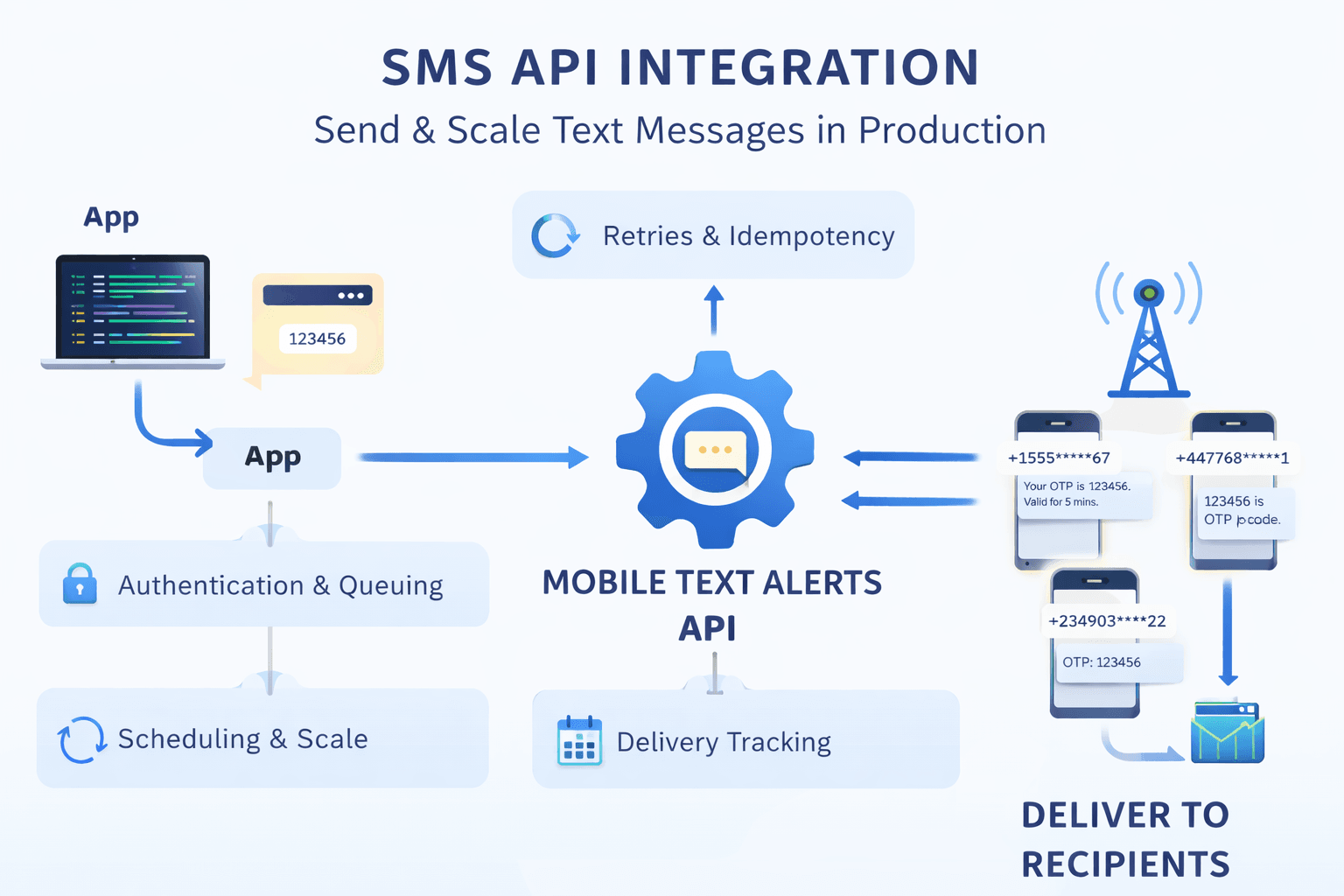
From your perspective, sending SMS is a single HTTP request. Behind the scenes, Mobile Text Alerts:
- Verifies your API key
- Normalizes phone numbers for carrier delivery
- Queues messages to handle traffic spikes
- Routes based on message type and recipient
- Handles long messages automatically
- Tracks delivery status
Understanding the /send request schema
Every send request posted through this endpoint must include who the message is going to and what will be sent. Everything else is optional and used to control behavior in production.
Content (the what):
Content fields are composable. You can send plain text, an image, a template, or combine them to build richer notifications.
- message (string): Plain text. Standard for OTPs and alerts.
- image (string): Image URL. Automatically triggers MMS delivery. You can include a
messagealongside animageto send text + media together. - templateId (number): Uses a pre-saved template. If the template includes a tracked link, you must also provide a linkId so Mobile Text Alerts knows which link to insert.
- isMMS (boolean): Forces MMS delivery for image attachment and longer character limits.
- rehost (boolean): Moves your image to Mobile Text Alerts servers to help with carrier deliverability.
- header/footer (string): Appends text before or after the message body (often used for branding or compliance text).
Note: linkId is only used with template-based content. It is not required when sending plain message text or images, even if those contain URLs.
Recipients (the who)
- subscribers (array): Raw phone numbers. Best for sending directly from your own database.
- subscriberIds / groups (array): Target existing Mobile Text Alerts contacts or segments.
- allSubscribers (boolean): Broadcast to your entire Mobile Text Alerts database.
- threadId (number): Continues an existing two-way conversation.
Optional production controls
- externalId (string): Your internal database ID. Crucial for mapping webhook status updates.
- tags (object): Metadata for analytics (e.g., {"type": "otp"}).
- properties (object): Data used to populate liquid variables for batch personalization (e.g., {"{{name}}": "Alice"}).
- scheduledDate (string): ISO 8601 timestamp for future delivery.
- repeat (object): Logic for recurring messages (daily/weekly/monthly).
- longcodeId (number): Specifies which of your dedicated numbers to send from.
When to use Mobile Text Alerts subscriber management
Most SMS API users send messages directly to phone numbers from their own database, forms, and apps. The subscribers parameter accepts any phone number in E.164 format. You send to the phone numbers you already have.
Use Mobile Text Alerts’ subscriber management features (subscriberIds, groups) when you need more than simple delivery.
Common reasons include:
- Audience segmentation: group users by behavior, location, or preferences
- Two-way messaging: replies are routed back with conversation context
- Per-subscriber message history: view all messages sent to a specific person
- Recurring campaigns: newsletters, reminders, or scheduled sends without rebuilding lists
Both approaches still rely on dynamic phone numbers. The difference is whether you want Mobile Text Alerts to only deliver messages or also manage subscribers.
Already have a contact list? Import contacts in bulk via spreadsheet or integration instead of adding them individually through the API.
Production SMS API playbook: common patterns in real systems
Moving from a “Hello World” script to a production environment requires thinking about reliability, scale, and observability.
The /send endpoint isn't just for text; it’s a data-rich gateway. By using optional variables like externalId, tags, and scheduledDate, you turn a simple message into a trackable business asset.
Before sending SMS in production, recipients must explicitly consent to receive texts from you. It’s required by TCPA (US), GDPR (EU), and carrier regulations worldwide.
Pattern 1: The Auth flow pattern (OTP/2FA)
When sending a security code, speed and traceability are everything. This pattern pulls a phone number from your user database (via SQLAlchemy for Python or Prisma for Node.js) and sends a time-sensitive code.
- Production Tip: Use
tagsto categorize these as "security" or "OTP." This helps you filter your billing and delivery reports later to see if your login codes are hitting a higher failure rate than your marketing texts. - Traceability: We use an
externalIdthat combines the User ID and a timestamp, making it easy to map the SMS back to a specific login attempt in your logs. - Implementation: The examples use SQLAlchemy (Python) and Prisma (Node.js) to fetch a phone number, but any database, ORM, or service can be used. The only requirement is that your application can retrieve the user’s phone number at send time.
Python with SQLAlchemy:
Snippet (adapt to your app)
from sqlalchemy.orm import Session
import requests
import os
import time

def send_login_otp(db: Session, user_id: int, otp_code: str):
    # Get user from your database
    user = db.query(User).filter(User.id == user_id).first()

    if not user or not user.phone:
        raise ValueError("User not found or has no phone number")

    # Send the OTP
    response = requests.post(
        "https://api.mobile-text-alerts.com/v3/send",
        headers={
            "Authorization": f"Bearer {os.getenv('MTA_API_KEY')}",
            "Content-Type": "application/json",
        },
        json={
            "message": f"Your login code is {otp_code}. Valid for 5 minutes.",
            "subscribers": [user.phone],
            "externalId": f"otp_{user_id}_{int(time.time())}",
            "tags": {
                "type": "otp",
                "userId": str(user_id),
                "environment": os.getenv("ENV", "production")
            }
        },
        timeout=30,
    )
    return response.json()
Node.js with Prisma:
Snippet (adapt to your app)
async function sendLoginOTP(userId, otpCode) {
  // Get user from your database
  const user = await prisma.user.findUnique({
    where: { id: userId },
    select: { phone: true }
  });

  if (!user || !user.phone) {
    throw new Error('User not found or has no phone number');
  }

  // Send the OTP
  const response = await fetch('https://api.mobile-text-alerts.com/v3/send', {
    method: 'POST',
    headers: {
      'Authorization': `Bearer ${process.env.MTA_API_KEY}`,
      'Content-Type': 'application/json'
    },
    body: JSON.stringify({
      message: `Your login code is ${otpCode}. Valid for 5 minutes.`,
      subscribers: [user.phone],
      externalId: `otp_${userId}_${Date.now()}`,
      tags: {
        type: 'otp',
        userId: String(userId),
        environment: process.env.NODE_ENV
      }
    })
  });

  return await response.json();
}
Pattern 2: High-volume personalization (liquid templates)
In production, you often need to send unique information to hundreds of people at once—like shipping updates or order confirmations.
Sending thousands of separate API calls is slow and inefficient. Instead, use Liquid Templates and the properties field to send one batch request where every message is personalized.
- How it works: You send a single
messagecontaining variables like{{firstName}}. You then provide apropertiesobject that maps each phone number to its specific data. - Production Tip: This is the most efficient way to handle "Batch" notifications. It reduces your network overhead and ensures all messages are queued instantly.
Python:
Snippet (illustrative batch logic)
import requests
import os

def send_personalized_batch(orders):
    # 'orders' is a list of dicts from your database
    # subscribers: ["3175551111", "3175552222"]
    # properties: {"3175551111": {"name": "Alice"}, "3175552222": {"name": "Bob"}}

    payload = {
        "subscribers": [o['phone'] for o in orders],
        "message": "Hello {{firstName}}! Your order #{{orderId}} has shipped.",
        "properties": {
            o['phone']: {
                "firstName": o['first_name'],
                "orderId": o['order_id']
            } for o in orders
        },
        "tags": {"type": "shipping_update"}
    }

    response = requests.post(
        "https://api.mobile-text-alerts.com/v3/send",
        headers={"Authorization": f"Bearer {os.getenv('MTA_API_KEY')}"},
        json=payload
    )
    return response.json()
Node.js:
Snippet (illustrative batch logic)
async function sendPersonalizedBatch(orders) {
  const payload = {
    subscribers: orders.map(o => o.phone),
    message: "Hello {{firstName}}! Your order #{{orderId}} has shipped.",
    properties: orders.reduce((acc, o) => {
      acc[o.phone] = { firstName: o.firstName, orderId: o.orderId };
      return acc;
    }, {}),
    tags: { type: "shipping_update" }
  };

  const response = await fetch('https://api.mobile-text-alerts.com/v3/send', {
    method: 'POST',
    headers: {
      'Authorization': `Bearer ${process.env.MTA_API_KEY}`,
      'Content-Type': 'application/json'
    },
    body: JSON.stringify(payload)
  });

  return await response.json();
}
Pattern 3: Bulletproof reliability (idempotency and retries)
In a production environment, the network will eventually fail. If an API request times out, you don’t know if the SMS was actually sent or if the connection dropped before it reached the server.
- X-Request-Id (idempotency): Always include an
X-Request-Idheader with a unique alphanumeric value (like a UUID). If you retry a request with the same ID, the API detects the duplicate. If it was already sent, the API returns a409 Conflictinstead of sending the message again—saving you money and preventing user spam. - Exponential backoff: If you receive a
429(Rate Limit) or500(Server Error), don't retry immediately. Wait a few seconds, then double the wait time for each subsequent attempt.
Python:
Snippet (retry logic to integrate into your sender)
import time
import requests
import uuid

def send_with_retry(phone, message, max_retries=3):
    # Generate a unique ID for this specific message attempt
    request_id = str(uuid.uuid4())

    for attempt in range(max_retries):
        try:
            response = requests.post(
                "https://api.mobile-text-alerts.com/v3/send",
                headers={
                    "Authorization": f"Bearer {os.getenv('MTA_API_KEY')}",
                    "X-Request-Id": request_id
                },
                json={"message": message, "subscribers": [phone]},
                timeout=10
            )

            if response.status_code == 200:
                return response.json() # Success!

            if response.status_code == 409:
                print("Duplicate request detected; message was already sent.")
                return {"status": "already_processed"}

            if response.status_code in [429, 500, 502, 503]:
                # Exponential backoff: 1s, 2s, 4s...
                time.sleep(2 ** attempt)
                continue

        except requests.exceptions.RequestException:
            time.sleep(2 ** attempt)

    return {"error": "Max retries reached"}
Node.js:
Snippet (retry logic to integrate into your sender)
async function sendWithRetry(phone, message, maxRetries = 3) {
  const requestId = crypto.randomUUID();

  for (let attempt = 0; attempt < maxRetries; attempt++) {
    try {
      const response = await fetch('https://api.mobile-text-alerts.com/v3/send', {
        method: 'POST',
        headers: {
          'Authorization': `Bearer ${process.env.MTA_API_KEY}`,
          'X-Request-Id': requestId,
          'Content-Type': 'application/json'
        },
        body: JSON.stringify({ message, subscribers: [phone] })
      });

      if (response.ok) return await response.json();
      if (response.status === 409) return { status: 'already_sent' };

      // Backoff if rate limited or server error
      if (response.status === 429 || response.status >= 500) {
        await new Promise(res => setTimeout(res, Math.pow(2, attempt) * 1000));
        continue;
      }
    } catch (err) {
      await new Promise(res => setTimeout(res, Math.pow(2, attempt) * 1000));
    }
  }
}
Pattern 4: Closing the loop (webhooks)
A 200 OK from the API only means we successfully received your request and put it in the queue. In the real world of telecom, a message can still fail after that point (e.g., the number is disconnected or the carrier blocked the content). To build a truly production-grade app, you need to know if the phone actually buzzed in the user's pocket.
- Assign an <code>externalId</code>: When you send an SMS, pass your internal database ID (like
order_123oruser_update_456). - Receive the Status: Set up a webhook URL in your Mobile Text Alerts dashboard. We will send a
POSTrequest to your server whenever the delivery status changes (e.g.,delivered,failed, orrejected). - Update your UI: Use these updates to show "Delivered" checkmarks in your app or to trigger an email fallback if the SMS fails.
Python (FastAPI):
Webhook handler example (reference implementation)
from fastapi import FastAPI, Request

app = FastAPI()

@app.post("/webhooks/sms-status")
async def sms_webhook(request: Request):
    # Mobile Text Alerts sends status updates as JSON
    data = await request.json()

    external_id = data.get("externalId")
    status = data.get("status") # e.g., "delivered", "failed"
    delivered_at = data.get("deliveredAt")

    print(f"Message {external_id} status updated to: {status}")

    # PRODUCTION PATTERN: Update your database status
    # await db.messages.filter(id=external_id).update(status=status, time=delivered_at)

    return {"status": "success"}
Node.js (Express):
Webhook handler example (reference implementation)
const express = require('express');
const app = express();

app.use(express.json());

app.post('/webhooks/sms-status', (req, res) => {
  const { externalId, status, deliveredAt } = req.body;

  console.log(`Message ${externalId} reached status: ${status} at ${deliveredAt}`);

  // PRODUCTION PATTERN: Update your database so your UI shows the correct status
  // await prisma.smsLog.update({
  // where: { id: externalId },
  // data: { status: status, updatedAt: deliveredAt }
  // });

  // Always return a 200 OK to acknowledge receipt of the webhook
  res.status(200).json({ received: true });
});

app.listen(3000, () => console.log('Webhook listener running on port 3000'));
Choosing the right route
Mobile Text Alerts allows you to send messages through different number types (routes). The route you use determines how fast messages are sent and how much volume you can handle.
- Toll-Free (8XX Numbers): The default for new accounts. They offer high throughput with no daily caps. This is the best choice for production apps, alerts, and confirmations.
- 10DLC (Local Numbers): Uses standard area codes (e.g., 212 or 310). Best for testing or low-volume, personal-feeling messages. Note: Daily limits and lower speed make these risky for time-sensitive OTPs.
- Short Codes (5–6 Digits): Premium numbers for mission-critical, high-volume messaging. They offer the fastest delivery speeds but require a dedicated provisioning process.
Rule of thumb: If you need fast, reliable delivery for a production app, stick with the default Toll-Free route. If you scale past 100k+ messages per day, please discuss a dedicated short code with the team.
You've sent your first message! 🎉
You now have a production-ready SMS foundation. From here, you can scale your infrastructure with these advanced patterns:
- Two-Way Messaging: Use webhooks to listen for customer replies and keywords like “HELP” to keep your database in sync with carrier opt-in status.
- CRM Sync: Push SMS delivery events back to Salesforce or HubSpot to give your sales team visibility into customer engagement.
- AI Integration: Connect the API to an AI agent to handle customer support via text.
- Global Expansion: Enable international routes to send messages to users outside the U.S. using country-specific sender IDs.
For advanced configuration, like scheduling and subscriber groups, check out the Mobile Text Alerts API documentation.
Ready to build? Get your free credits here.
Author Bio
Vera Agiang is a technical GTM partner and self-proclaimed math nerd. She helps developers make sense of APIs, automation tools, and AI systems.
With an engineering background and many tabs open, she builds and tests every workflow she writes about, refusing to publish anything that doesn’t work in production.
She turns complex software and messy processes into clear technical and sales assets that improve the developer experience.