


We Apple users love our blue bubbles.
Apart from the benign aesthetic benefit, iMessage gives people a more user-friendly way to send text messages apart from having to use traditional SMS.
But how can you use the benefits of iMessage on a mass messaging basis?
Most mass texting apps only allow you to send traditional SMS and MMS.
Here’s a walkthrough of how to send a mass text iMessage.
How to send a mass text iMessage with Mobile Text Alerts: 4 steps
Mobile Text Alerts is one of the few texting apps that lets you send bulk iMessage content.
Sending iMessage for business via Mobile Text Alerts just takes a few steps.
Note: Access to iMessage sending may be limited to eligible accounts. Contact support to request access.
Here’s how it works…
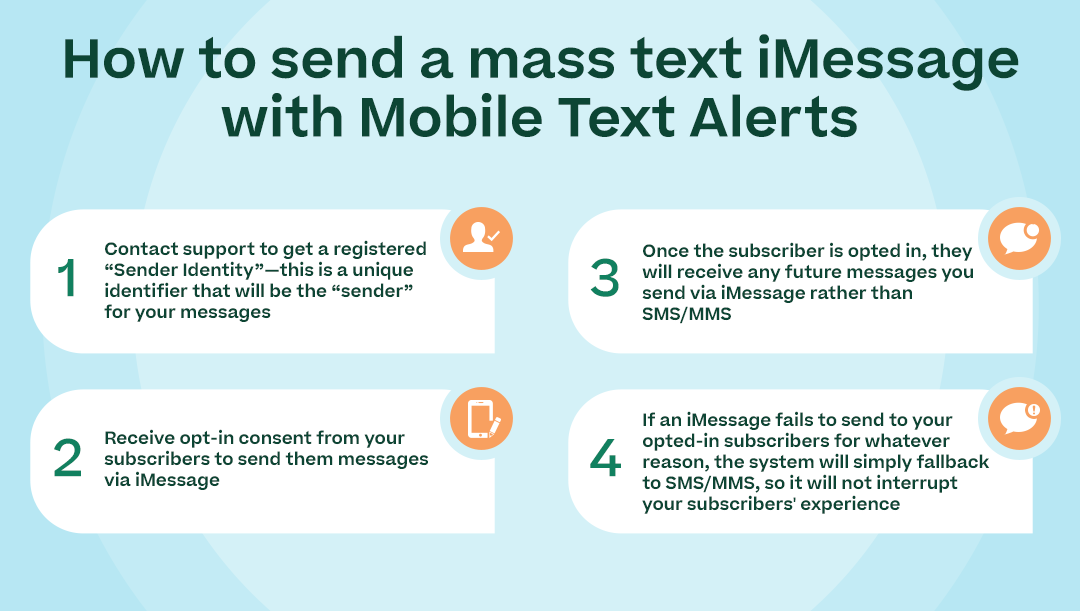
Contact support to get a registered “Sender Identity”—this is a unique identifier that will be the “sender” for your messages.
- The Sender Identity will display in the form of an email address
- While the domain of the Sender Identity email address will be fixed by Mobile Text Alerts (for example, imsg.co), your brand name can be included at the beginning (i.e., BrandName@imsg.co).
- You can have separate Sender Identities that correspond to the different phone numbers you have set up in your Mobile Text Alerts account
Receive opt-in consent from your subscribers to send them messages via iMessage.
- In order to do this, a subscriber must send a message from their iMessage-enabled device to your Sender Identity acknowledging that they are interested in receiving messages from you—this can be as simple as them saying, “Sign up”
- To help you with the opt-in step, you can use our Deeplink option, which you can create via our API
- Deeplinking will allow you to create a “deeplink” that you can send out to your audience—when your audience clicks on the link, it will prefill an opt-in message to your Sender Identity, so the subscriber just has to hit “Send” to opt in
- (With deeplinking, if the deeplink identifies that the phone does not support iMessage, it will fall back to a suitable redirect link that you can designate)
Once the subscriber is opted in, they will receive any future messages you send via iMessage rather than SMS/MMS.
If an iMessage fails to deliver to an opted-in subscriber, the system will attempt an SMS/MMS fallback when possible, which helps prevent interruption of your subscribers’ experience.
Once a subscriber has opted in to receive iMessage from you, you can send or automate a mass text iMessage via an online dashboard or via API.
Whenever you send a message from your Mobile Text Alerts account, your "regular" recipients will receive the message via SMS/MMS, while those who have opted in to iMessage will receive the mass text via iMessage.
You can view a fuller explanation of how to send bulk iMessage texts in our API documentation, along with the instructions for creating your deeplinks via API.
Example of how to send a mass text iMessage
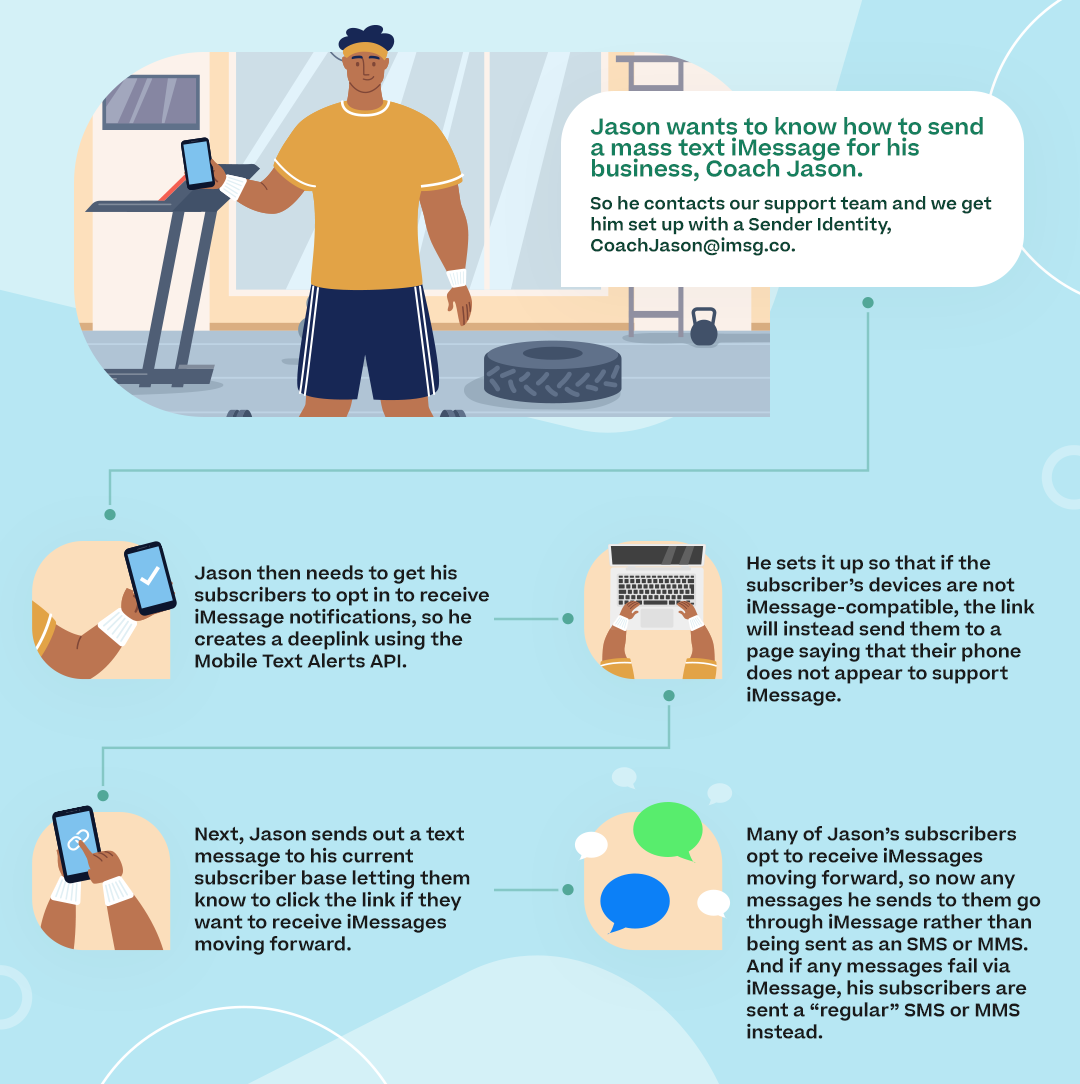
Here’s an example of how this flow could look…
Jason wants to know how to send a mass text iMessage for his business, Coach Jason. So he contacts our support team and we get him set up with a Sender Identity, CoachJason@imsg.co.
Jason then needs to get his subscribers to opt in to receive iMessage notifications, so he creates a deeplink using the Mobile Text Alerts API. He sets it up so that if the subscriber’s devices are not iMessage-compatible, the link will instead send them to a page saying that their phone does not appear to support iMessage.
Next, Jason sends out a text message to his current subscriber base letting them know to click the link if they want to receive iMessages moving forward.
(Note: Our recommendation is for your deeplink to be sent from an existing Mobile Text Alerts number that you’ve previously used with your subscribers. That way, your subscribers will recognize the number, so you can have a better chance that your subscribers will click the link and opt in to your iMessages.)
Many of Jason’s subscribers opt to receive iMessages moving forward, so now any messages he sends to them go through iMessage rather than being sent as an SMS or MMS. And if any messages fail via iMessage, his subscribers are sent a “regular” SMS or MMS instead.
Why send iMessage marketing texts?
There are a few reasons why you’d want to use iMessage for business via Mobile Text Alerts:
- Your messages will come from a trusted Sender Identity that subscribers recognize, so your subscribers may be more likely to open and read them
- Your messages will be able to be delivered to Apple users around the world, so you can extend your reach
- Your messages can include larger file sizes than MMS, so you have more flexibility in regard to the type of content you can send
- Your messages will be sent over a secure network, so you and your subscribers can have confidence in the privacy of your interactions
- Your messages aren’t subject to the same strict messaging regulations as standard SMS/MMS (which can be helpful if you’re sending messages with sensitive content, for example)
Overall, sending mass texts through iMessage rather than SMS or MMS could lead to a better experience for your subscribers—and therefore, better engagement with your messages.
Pricing and compliance: what you should know before you start
Budget concerns, legal compliance, and/or the hassle of moving contacts may keep teams from trying iMessage marketing.
Below are the practical answers that matter when deciding whether to add iMessage to your messaging stack, plus how Mobile Text Alerts reduces friction so you can test without risk.
- Pricing model and trial options: Mobile Text Alerts offers tiered plans starting at $20/month ($25 month-to-month), and volume discounts so per-message costs fall as your list grows. You can get a trial account to test delivery and engagement on a small segment before committing to a larger plan.
- Compliance and opt-in rules: iMessage requires a subscriber to explicitly send an opt-in message to your Sender Identity. You can use deeplinks to prefill opt-in texts to get people to opt in to iMessage marketing.
- Switching and importing contacts: Export and map your subscriber fields, then import into the Mobile Text Alerts dashboard or API. The team supports CSV imports and provides import validation to minimize duplicates and consent errors. (But note, you’ll still need to get your subscribers to send an SMS to your iMessage Sender Identity specifically.)
- Support and onboarding: Dedicated setup guidance, API docs, and customer support reduce the time to first campaign.
- Fallback and deliverability guarantees: When iMessage fails, messages automatically route as SMS/MMS so you avoid lost messages and preserve the customer experience.
6 iMessage marketing and alert ideas
Here are 6 iMessage marketing campaign ideas with a brief execution tips you can use right away.
- Appointment and reservation reminders: Send confirmations and rescheduling links with rich images.
- Flash sales and limited offers: Use larger images for short-window promotions.
- VIP loyalty drops: Send exclusive content or early access to top customers with a Sender Identity that includes your brand for added credibility.
- Order updates with multimedia receipts: Attach clearer product photos, invoices, or tracking snapshots so customers feel more informed.
- Quick surveys and NPS requests: Ask one or two questions prompting quick replies.
- Urgent alerts and status updates: For time-sensitive notices, the encrypted channel and clear sender identity may reduce confusion during critical communications.
How to get started with sending a mass text iMessage
To get started, you just need to get an iMessage Sender Identity set up for your account.
Contact us and ask about getting an iMessage Sender Identity and we’ll get you squared away. (Include the name of your brand in your request so that we can get a Sender Identity set up that closely corresponds to your business.)
Note: we can’t guarantee access to everyone who requests a Sender Identity.
Author Bio

Sam Pelton is the content director for Mobile Text Alerts, an SMS service that gives businesses an easier way to reach customers and audiences. He has 12 years of experience working with the texting platform in the areas of customer support, quality assurance testing, content creation, copywriting, and marketing strategy. He’s also a father of 6 and loves a good (bad) dad joke.