



To identify what can derail a Black Friday SMS campaign...
...we analyzed support tickets from October 1 through December 5, 2025, looking for Black Friday or Black Friday-adjacent questions. We uncovered these items as some of the primary concerns our customers had:
- Registration approval
- Opt-in process
- Audience setup
- Automations setup
- Message credit availability
- Deliverability
So here’s how to make sure you’re ready for Black Friday SMS in all these different areas.
How to make sure you’re ready for Black Friday SMS: TL;DR
To make sure you’re ready for Black Friday SMS...
- Start the registration process four weeks before your Black Friday campaign launches
- Live-test all the different elements of your opt-in flow
- Do a thorough check on your audience setup
- Do a thorough check on your SMS automation flows
- Make sure you have enough SMS credits
- Make sure you follow SMS best practices so you don’t run into deliverability issues
How can I make sure my SMS registration is approved in time to send for Black Friday?
Our analysis of support tickets revealed concerns about getting a sending phone number registered and ready to go in time for their campaigns.
In order to send any sort of business SMS, all businesses or organizations need to register their brands with the mobile carriers.
And if you haven’t already submitted registration, we would recommend three things you need to do to make sure you have time to get approved before your Black Friday campaigns are set to begin:
- Submit the registration form about a month in advance from when you want to start sending Black Friday messages
- Fill out the registration form completely and accurately to avoid delays in approval
- Make sure you designate a marketing use case if you’re sending promotional Black Friday messages
Approval timelines
Earlier this year, we analyzed 2,997 approved toll-free number registrations submitted through Mobile Text Alerts between December 12, 2023, and July 13, 2026 (with approvals recorded through July 15, 2026), to help give some insights on toll-free timelines.
We also asked support specialist Aaron Butterfield for his insights on 10DLC registration timelines.
The results showed that:
- The median time for toll-free approval was 2.3 days, meaning that most of the time it seems approvals happen pretty quickly
- Although the norm seems to be quick approval, the average approval time was 17.2 days, showing that occasionally the approval process can take much longer
- The expected timeframe for 10DLC, according to Butterfield, is 7-10 days.
With all of that in mind, we recommend that you submit your approval request one month in advance. Although it is not expected to take that long to get approval (in all likelihood, you will get approval within 1–2 weeks), it is best to give yourself plenty of time in case approvals are delayed.
Registration delays
An AI analysis of 376 SMS registration submissions (whether approved or rejected) and 234 registration-related support tickets revealed that when submitting their SMS registration forms, registrants sometimes struggle with showing clarity, credibility, and compliance.
To help make sure your registration is successful…
- Fill out your form completely and accurately
- Include clear sample messages
- Make sure sample messages actually match your declared use case
- Use your business email address (not a personal email address) in the form
What you’re trying to make sure is that the carriers are able to determine your brand credibility through complete and verifiable brand information, a valid website or social media page, a professional email address that matches the brand name, and sample messages that are coherent and “clean.”
The takeaway: Start the registration process four weeks before your Black Friday campaign launches. Most applications will be approved sooner, but your Black Friday plans should give your team plenty of wiggle room in case there are unexpected delays.
How can I make sure my SMS opt-in process is good to go for Black Friday?
In our analysis of support tickets, one recurring theme was issues in the opt-in process, which can be resolved by live-testing every element in the flow.
Some of the issues our customers ran into in regard to opt-in processes were:
- An unexpected welcome message being sent to subscribers
- An old opt-in number no longer working
- Unwanted fields appearing on the online sign-up form
- Errors with importing an external subscriber list
- An incorrect sign-up link
Some elements of the opt-in process that would be good to test include:
- Texting in to any opt-in numbers being used in the process
- Filling out any web sign-up forms being used in the process
- Scanning any QR codes being used in the process
- Checking the auto-response you receive upon signing up
- Spot-checking that your contact list imported correctly (if importing a spreadsheet or using an automatic sync)
The takeaway: Live-testing all the different elements of your opt-in flow will help reveal whether there are any hiccups in the process before you go live with your Black Friday campaigns.
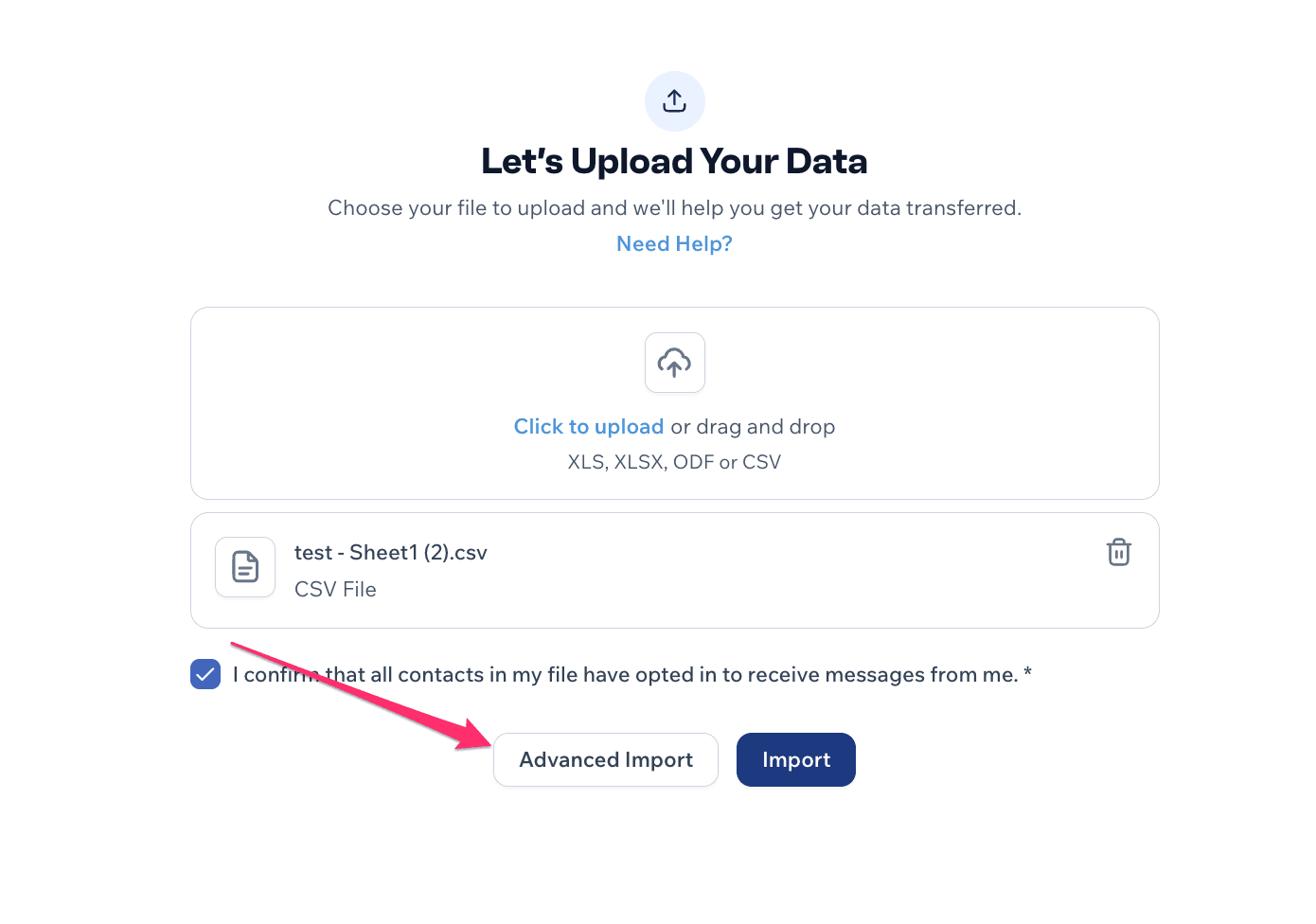
We also asked SMS support specialists CJ Chidiegwu, Kallie Shavor, and Aaron Butterfield about advice on how to avoid issues when importing contact lists from other sources. Here are some common issues to watch out for, according to them:
- Often there are group name mismatches when using the basic import option—make sure the wording for the group names on the spreadsheet is an exact match with the wording for the group names in your Mobile Text Alerts account
- Sometimes formatting within the spreadsheet hinders an upload—if an upload fails, try copying all the cells in the spreadsheet and pasting them into a new sheet using the “paste values only” option to help remove any formatting issues
- Spreadsheet imports can also be used to update info on existing contacts, but this option must be designated during the import process—make sure to select the “advanced” import option and select “Update Existing Subscribers” before importing
- An additional note: if using the “advanced” import option, you’re able to download a list of any lines within the spreadsheet that didn’t upload correctly, so you can use this to see which subscribers did not get successfully added into your database
How can I make sure my SMS audiences are set up correctly before Black Friday?
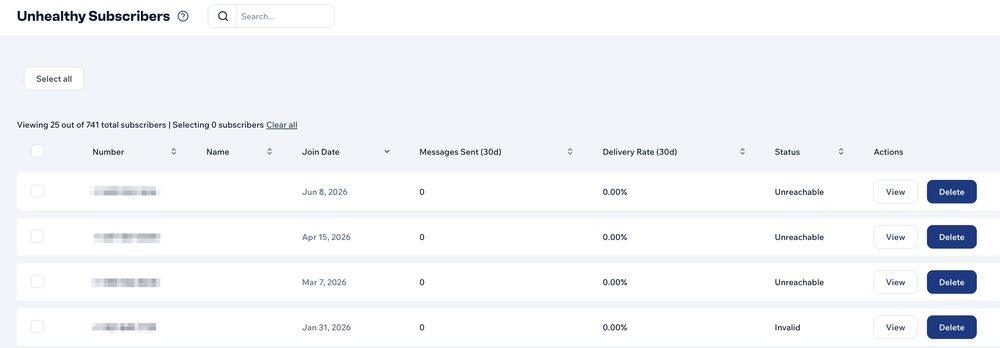
Another issue that surfaced in our analysis of support tickets was concerns about audience setup, particularly for those who are segmenting audiences via groups. These concerns included groups not filtering as expected, a question about segmenting based on attributes, issues with importing lists, and problems related to removing “unhealthy” (unreachable) contacts.
The takeaway: Here are some checklist items to make sure your audiences are good to go:
- Confirm that any list uploads placed subscribers into the desired groups
- If using adaptive groups, verify that your groups are being filtered as expected
- If using a web sign-up page for opt-ins, make sure the appropriate groups are being displayed on the page (and that groups you want hidden are truly hidden)
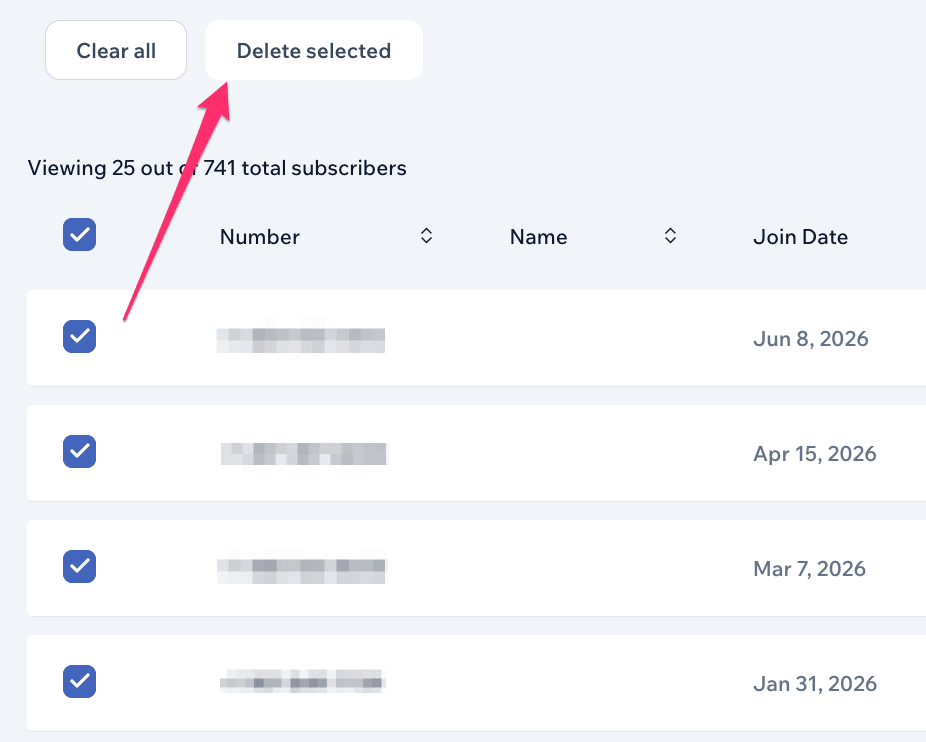
- Consider removing “unhealthy” subscribers using the Unhealthy Subscribers report, but be careful not to remove more contacts than you intend.
How can I make sure my Black Friday SMS automations are working as expected?
Our analysis of support tickets revealed concerns about automations working as expected. For example:
- Workflow limitations
- Automation timing
- Message scheduling failures
The takeaway: Some steps you can take to help make sure your SMS automations are functioning as you intend for them to function include:
- Double-checking that your account is set to the correct time zone in your account settings (for messages that are time-specific)
- Clicking through any automated workflows to check whether they have the appropriate triggers and message content
- Running a test number or a series of test numbers through your entire workflow(s)
- Consider using the API for any automation functionality not currently available within the platform
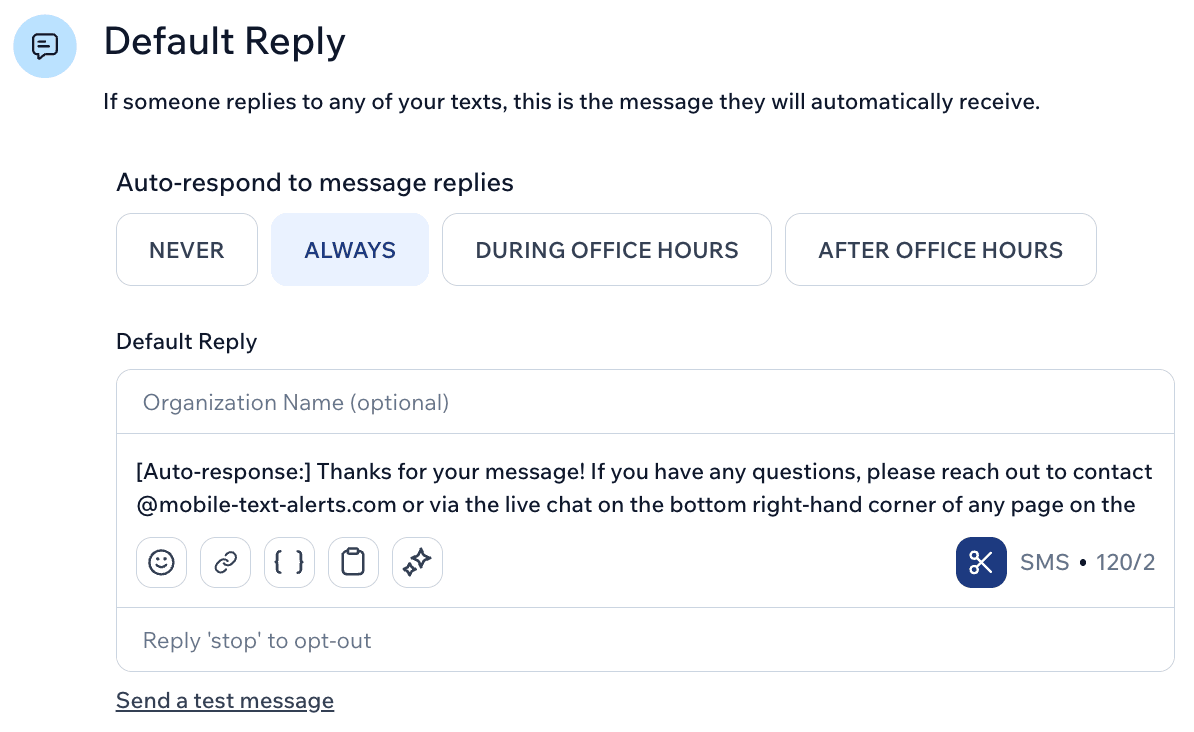
One generally common automation you may want to consider setting up is an auto-response for when people reply to your messages. That way, they’ll receive an acknowledgement of their response right away and can be given any further instructions needed.
To create an auto-response…
- Go to Inbox→Reply Settings
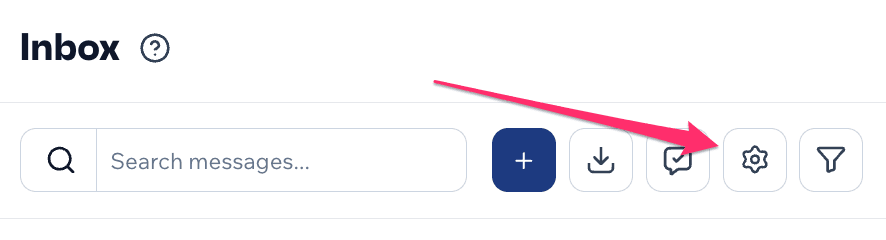
- Scroll to the bottom of the page to set up your auto-reply
How can I make sure I have enough SMS credits for Black Friday?
Out of the support tickets we analyzed, one simple yet common thread was in regard to message credits and billing. You don’t want your Black Friday campaigns frozen because of running out of message credits or billing issues!
The takeaway: Some questions to consider would include:
- Do I have enough credits for the planned sends?
- Why do credits sometimes seem to drop so fast?
- Can I temporarily upgrade for Black Friday and holiday volume?
- How do I prevent scheduled messages from failing?
Steps to make sure you have enough credits for Black Friday SMS
Some simple steps you can take to make sure you have enough credits for your Black Friday and holiday SMS are the following:
- Take into account whether you’ll be sending long messages, emojis, or attachments in your messages, as this can sometimes eat up more message credits than expected (see “how message credits work” below)
- Make sure your card on file is up to date in case you need to make last-minute purchases of extra credits
- Turn on “auto top-up” in your billing settings if you want the system to automatically purchase additional credits when you run out
- Remember that if you’re on a month-to-month plan, you can temporarily upgrade just for a couple of months if you know you’ll have an uptick of messages for Black Friday and the holiday season
Also, if you are scheduling messages ahead of time, keep in mind that you need the necessary credits to be available at the actual time of the scheduled send.
How message credits work
Here’s a basic breakdown of messaging credits within Mobile Text Alerts:
- With a typical send (an SMS of 160 characters or less), each recipient for your message counts as 1 credit, so a message sent to 3,000 recipients would use up 3,000 credits
- If your SMS goes beyond 160 characters, it will count as 2 or more credits per recipient (depending on how long the message actually is—every 160 characters adds another credit per recipient)
- If you include an emoji, this reduces the number of characters per message down to 70
- If you choose to send your message as an MMS (i.e., including an image or other attachment), this counts as 3 credits per recipient
All of the above should be considered, then, when trying to evaluate how many credits you’ll need for Black Friday.
For example, if you’ll just be sending basic, short messages, you’ll only need 1 credit per recipient for each of your campaigns.
But if you’re going to have some longer messages in there, if you’re going to include emojis, or if you’re going to send some images in your campaigns, you’ll need a higher credit allotment. (This is when it can sometimes feel like message credits are dropping fast.)
How do I avoid deliverability issues with Black Friday SMS?
One final theme we noticed in our analysis of support tickets was concerns regarding deliverability.
The takeaway: Three steps you can take to help minimize the chance of running into deliverability issues include (1) waiting until your account is fully approved before sending any major messages, (2) sending “clean” message content, and (3) checking with support if you do run into any issues or preemptively showing them your message content ahead of time, since they can help provide insight into potential deliverability concerns.
An additional note: If you’re sending promotional Black Friday messages, your registered use case needs to be “marketing” or else you may run into deliverability issues. If you’ve already filled out your brand registration form and did not select “marketing” in your initial submission, contact support as soon as possible to ask about getting set up for a marketing use case.
What is “clean” SMS content?
According to our support specialists, “clean” SMS content follows standard SMS best practices for content:
- Submit the brand registration form provided by your SMS solution
- Follow basic consent guidelines—for example, make sure you receive permission from people before texting them, don’t send messages early in the morning or at night, and include opt-out instructions in messages
- Identify your brand name in all your messages
- Don’t engage in atypical, “spam-like” sending behavior, such as sending multiple messages to the same phone numbers in a single day, including multiple links in your messages, or including high-pressure content (beyond a typical “urgency” promotion) in your messages
- Don’t send messages outside of your registered use case (you can expand your use case if needed)
- Avoid “questionable” content, including content related to topics like tobacco, cannabis, firearms, gambling, or risky financial opportunities
If your content follows all of the above guidelines, you’ll have a much lower risk of running into deliverability issues.
Black Friday SMS guidelines and template
For Black Friday, keeping your SMS content compliant can help reduce the risk of deliverability issues.
Keep your messages...
- Branded: Include your brand name, preferably at the beginning of the message.
- Low-pressure: Avoid excessive urgency, spammy tactics and regulated content.
- Simple: Use one link at most, or no link.
- Compliant: Include clear opt-out instructions.
What the data says
We analyzed more than 200 million messages sent by Mobile Text Alerts customers between January 1 and June 30, 2026. While the data includes both marketing and transactional messages, a few trends are worth considering for your Black Friday campaigns:
- Keep it short: The average business SMS is just 139 characters. Staying under 160 characters also helps you avoid being charged multiple credits.
- Don’t overdo emojis: Only 2.8% of business SMS included an emoji. This could be an opportunity to test, but Black Friday may not be the best time to experiment.
- Don’t worry too much about personalization: Just 21.4% of business SMS used a personalized token, such as a first name. Again, this could be worth testing, but we’d recommend saving those experiments for your regular messaging.
Our recommendation
For Black Friday, keep your SMS clear, brief and simple. Focus on delivering the offer and making it easy for customers to understand what to do next.
| Template: [Brand Name] - [Offer] [CTA] [Link] [Opt-Out Instructions] |
|---|
| Example 1: Coach Joe Gunnar - Special Black Friday opportunity… 50% off all business courses today only! Shop now: https://mbltxt.com/az1oe Reply STOP to opt out |
| Example 2: Jewelry Plus - Exclusive Black Friday drop with free shipping live now! Catch it while supplies last! Shop here: https://mbltxt.com/xI917 Reply STOP to opt out |
| Example 3: Pan Bistro - Black Friday special! Free app AND dessert with any entree purchase today. Check out the menu now: https://mbltxt.com/dP32d Reply STOP to opt out |
Don’t do this…
❌ “35% OFF FOR BLACK FRIDAY NOW!!! https://mbltxt.com/I9Olss”
What’s wrong: No brand name, all-caps copy, excessive punctuation and no opt-out instructions.
❌ “Coach Joe Gunnar - Special Black Friday opportunity… 50% off all business courses today only! For startups: https://mbltxt.com/az1oe For more advanced training: https://mbltxt.com/az1op”
What’s wrong: Multiple links and no opt-out instructions. At more than 160 characters, this message will also use 2 message credits.
❌ “Pan Bistro - Black Friday special! Free wine with any entree purchase today. Check out the menu now: https://mbltxt.com/dP32d Reply STOP to opt out”
What’s wrong: The message promotes regulated content (alcohol).
Black Friday campaign examples
Pre-Black Friday promos
Send texts with pre-Black Friday deals.
[Brand Name] - The savings start now! 20% off [product] today only for early Black Friday. Shop now: [link] Reply STOP to opt out
[Brand Name] - Early Black Friday: get 10% off orders over $1,000 until [date]. Order here: [link] Reply STOP to opt out
Black Friday warm-ups
Prep people for the “big day” with warm-up messages announcing your upcoming Black Friday deals.
[Brand Name] - Big Black Friday deals start [date]! See the discounts here: [link] Reply STOP to opt out
[Brand Name] - Stop by on Black Friday for our biggest savings yet! Reply FRIDAY now for a sneak peek at the deals (reply STOP to opt out)
Day-of promos
We’d recommend that you keep your actual Black Friday message short, sweet, and to-the-point.
[Brand Name] - Black Friday deal today only! Buy a $100 gift card now and get a free [service]: [link] Reply STOP to opt out
[Brand Name] - Black Friday alert! Get 50% off all online courses for 1 day only. Choose your course here: [link] Reply STOP to opt out
Follow-ups (+ Cyber Monday)
Keep your subscribers engaged with follow-up and Cyber Monday messages.
[Brand Name] - Black Friday’s over but the savings aren’t! Save an additional 20% on clearance items until [date]. Shop here: [link] Reply STOP to opt out
[Brand Name] - Cyber Monday special! Book [service] online today and save 30%: [link] Reply STOP to opt out
Take full advantage of SMS this Black Friday and holiday season. Get a free Mobile Text Alerts trial now.
Methodology
For this analysis, we reviewed support conversations from October 1 through December 5, 2025, covering the full ramp into Black Friday and the Black Friday/Cyber Week period itself. Across that timeframe, our analysis returned 353 tickets, focusing not just on tickets that explicitly mentioned Black Friday, but also on the operational issues most relevant to holiday SMS campaigns. Because some of the analyzed time windows overlapped, some tickets were counted more than once, so the number of unique tickets is lower than 353. The issues considered would include things like sender-number approval delays, deliverability problems, list setup issues, credit and volume planning, and scheduling or workflow failures. In other words, the goal was to understand both the direct Black Friday questions customers raised and the practical blockers that could affect Black Friday campaign readiness.
When we re-examined support tickets specifically for strategy-related Black Friday questions, we found that most conversations were still dominated by operational readiness rather than campaign strategy. Customers were far more likely to ask about approval delays, deliverability, list setup, credits, and workflows than about timing, cadence, segmentation strategy, or promotional planning for Black Friday itself.
Some insights were also provided by customer support specialists:
- Kallie Shavor has been a customer support specialist at Mobile Text Alerts since October of 2022 and helps customers weekly with registration questions and issues.
- CJ Chidiegwu has been a customer support specialist at Mobile Text Alerts since June of 2023 and helps customers weekly with registration questions and issues.
- Aaron Butterfield has been a customer support specialist at Mobile Text Alerts since April of 2025 and helps customers weekly with registration questions and issues.
FAQ
How long does SMS registration take?
Why are the texts being rejected / not being received?
Why did my credits drop so low after only sending a few messages?
Why is my spreadsheet import not working?
Author bio

Sam Pelton is the content director for Mobile Text Alerts, an SMS service that gives businesses an easier way to reach customers and audiences. He has 12 years of experience working with the texting platform in the areas of customer support, quality assurance testing, content creation, copywriting, and marketing strategy. He’s also a father of 7 and loves a good (bad) dad joke. Connect with him on LinkedIn.