



Explore this content with AI
There’s a lot of friction and confusion out there surrounding the SMS registration process for business texting!
Using an internal AI tool, I analyzed 2,997 approved toll-free number registrations submitted through Mobile Text Alerts between December 12, 2023, and July 13, 2026 (with approvals recorded through July 15, 2026), to help give some insights on timelines.
I also asked SMS support specialists to give their insights on timelines and requirements based on experience - and I did a personal walkthrough of the SMS registration process myself so I could share firsthand what is involved.
Let’s take a look at the results to give you everything you need to know about SMS registration! (The topic you’re most interested in of any topic in the world, I’m sure!) 😁
SMS registration key takeaways
- After calculating toll-free SMS registration submission dates against approval dates, across the dataset the average approval time was 17.2 days and the median was 2.3 days.
- According to SMS support specialist Aaron Butterfield, 10DLC registrations typically take slightly longer than toll-free, around 7–10 days.
- According to customer success manager Jack Snyder, short code registrations typically take 6 weeks or more.
- The SMS registration process typically involves filling out a simple form which your SMS provider submits to the mobile carriers for approval on your behalf.
- Toll-free numbers are the easiest and least expensive to register, followed by 10DLCs and then short codes.
What is the SMS brand registration process?
The SMS brand registration process is the process required by the mobile carriers in which businesses/organizations wanting to send SMS must submit their brand or campaign information for approval.
The point is to help protect consumers from spam and unwanted messages. (A worthy goal, we have to admit!)
A registration process is required regardless of what type of phone number you want to use to send your messages (toll-free, 10DLC, or short code).
The process involves the following:
- You or a representative from your brand must fill out a form with some information about your business and use case (this form is typically provided by your SMS provider - that’s us! 👋).
- You then submit this form to your SMS provider.
- Your SMS provider submits this form to the wireless carriers for approval.
- Your SMS provider contacts you once your registration has been accepted or rejected.
- If your registration is rejected, you can correct any issues with the submission and resubmit.
Here’s an example of a toll-free verification registration within the Mobile Text Alerts dashboard:
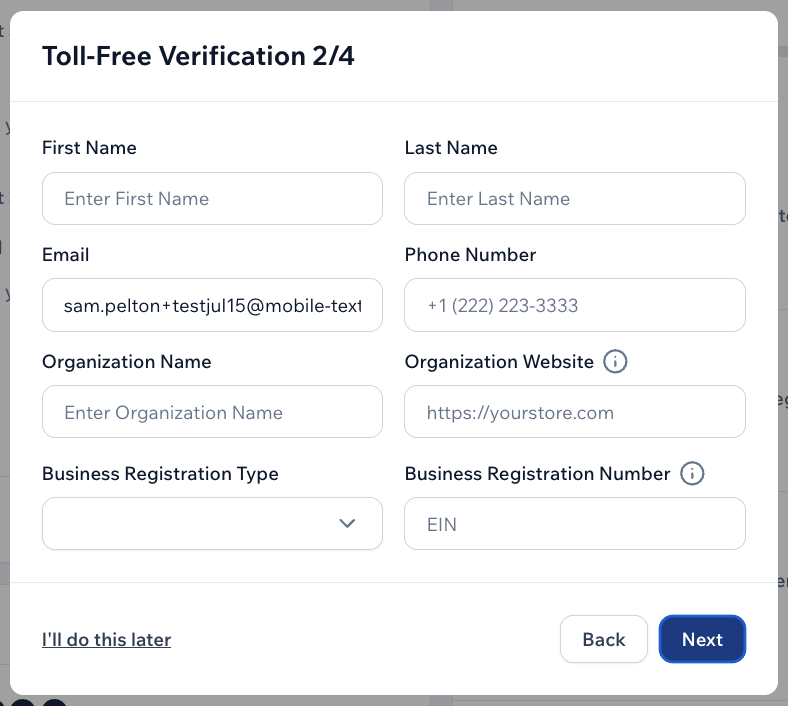
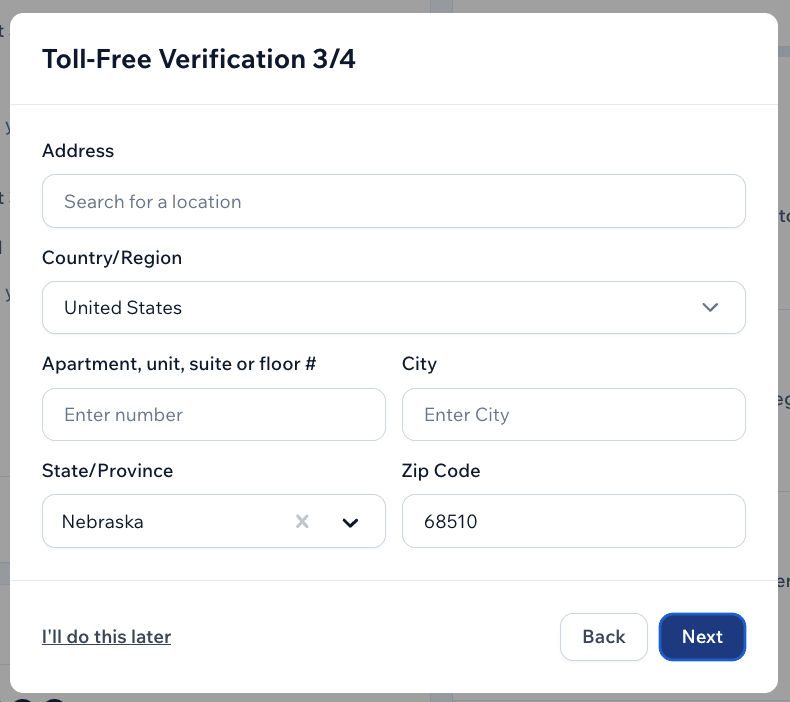
It will ask for basic business information, such as the first name, last name, email, phone number, organization name, organization website, business type, EIN, and organization address.
Make sure to give all accurate information and to use your business email address rather than a personal email address within the* email* field. (More on that below!)
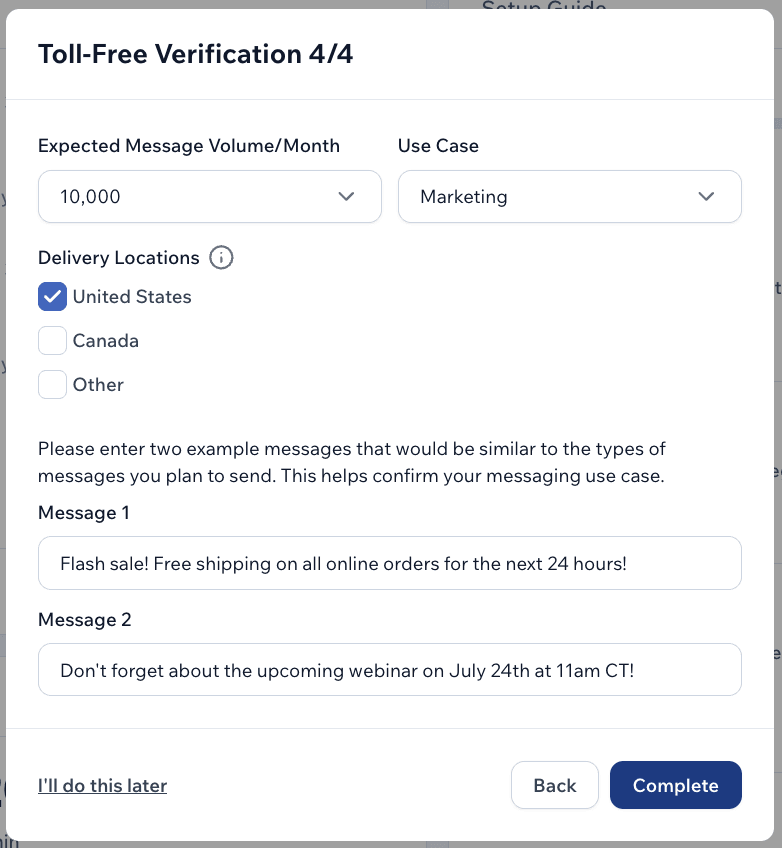
Next, you’ll designate approximately how many messages you expect to send per month, as well as the overall use case, the primary country you’ll be sending to, and two example messages of the type of content you’ll be sending.
For “use case,” I can see in the form that you’re able to select from the following:
- Account notification
- Customer care
- Delivery notification
- Higher education
- Marketing
- Public service announcement
- Fraud alert messaging
- Two-factor authentication
- Charity / non-profit
- Events
- K-12 education
- Polling and voting (non-political)
- Political election campaigns
- Security alert
If you feel your use case fits into more than one category, simply choose the one that seems like the “best fit.”
Make sure your example messages match the use case that you designate here.
Once you submit all this information, your information will be passed on to the mobile carriers on your behalf. Then you’ll simply need to wait for a representative from Mobile Text Alerts to let you know whether your registration was approved or not.
What is 10DLC vs. short code vs. toll-free registration?
The three basic types of phone numbers you can use to send business texts are toll-free numbers, 10DLCs, and short codes. For all three of these options, you’ll need to submit brand registration to the mobile carriers.
| Number Type | Format | Cost | Typical Registration Time | Registration Form | Best For |
|---|---|---|---|---|---|
| Toll-free | 800-prefix number | Free (included on all Mobile Text Alerts plans) | 2–3 days | Standard form | No added cost, fastest setup, no preference on area code |
| 10DLC | Local area code (10-digit) | Small monthly fee on some plans | 7–10 days | Standard form | Want a local area code, can tolerate a slightly longer setup |
| Short code | 5–6 digit number | ~$600/month | ~6 weeks (sometimes more) | More detailed form | Larger SMS budget, enterprise volume, short easy-to-remember opt-in number |
Registration time for toll-free based on an analysis of 2,997 approved Mobile Text Alerts registrations, Dec 12, 2023–July 13, 2026. 10DLC and short code timelines per SMS support specialist Aaron Butterfield and customer success manager Jack Snyder, respectively.
Toll-free numbers
Toll-free numbers are low-cost (a toll-free number is included for free on all Mobile Text Alerts plans) and the registration process is fast (typically 2–3 days, according to an analysis of 2,997 approved toll-free number registrations submitted by Mobile Text Alerts customers between December 12, 2023, and July 13, 2026).
In other words, the mobile carriers seem to scrutinize toll-free numbers a bit less, so the process for getting set up is slightly more hassle-free.
To register a toll-free number, you submit a registration form within the Mobile Text Alerts platform and wait for approval as we process your registration on your behalf.
You can choose a toll-free number if you:
- don’t want to add any extra costs
- want faster implementation
- don’t have a preference on the phone number’s area code
10DLC
10DLC stands for “10-digit long code.” These are 10-digit numbers that are sometimes preferred by businesses because they have a local area code rather than the “800” prefix that toll-free numbers have. However, 10DLCs sometimes cost more than toll-free numbers and the registration process takes longer (typically 7–10 days, according to customer support specialist Aaron Butterfield).
Some brands might prefer 10DLCs because of the trust associated with having an area code in the recipient’s timezone, as opposed to a “random” toll-free number.
As with toll-free numbers, the registration process itself involves submitting a registration form within the Mobile Text Alerts platform and waiting for approval as we process your registration on your behalf.
You can choose a 10DLC if you:
- don’t mind a small monthly fee
- don’t mind slightly longer implementation
- want to be able to send messages from a local area code
Short code
Short codes are shorter sending numbers (usually 5 or 6 digits). Short codes are sometimes preferred by larger brands because they allow for higher throughputs and are easier for customers to remember.
The shorter number is especially preferred for opting in, since opting in sometimes involves texting a word to your account’s number (for example, “text WORD to 12345” is easier for users to do than “text WORD to 877-123-4567”).
Short codes cost around $600 per month. The registration process for short codes involves submitting a slightly more involved registration form within the Mobile Text Alerts dashboard:
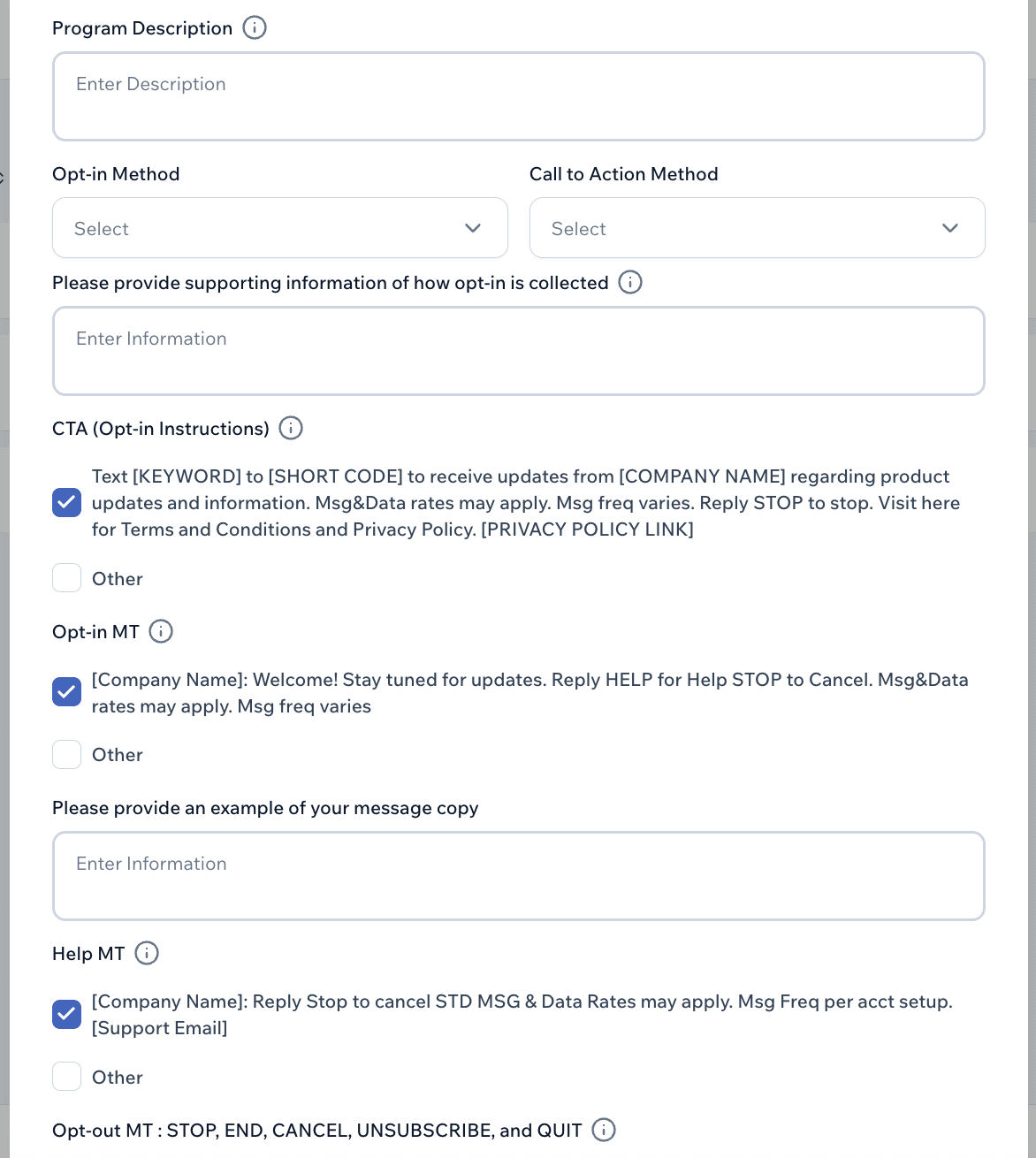
Mobile Text Alerts will then submit the form on your behalf for mobile carriers to review, and the review process takes about 6 weeks (more in some cases), according to customer success manager Jack Snyder.
You can choose a short code if you:
- have a larger SMS budget
- don’t need immediate implementation
- send enterprise messaging volumes
- want a short and easy-to-remember text-in number for opt-ins
What are SMS registration requirements?
SMS registration requirements involve submitting a form that includes (per my personal experience with the SMS registration form process):
- Contact details:
- Name
- Phone number
- Email (use the same domain as your business website here)
- Basic business information
- Organization/business name (make sure this matches your registered business name)
- Organization/business website
- EIN or other business registration number
- Address (this would be the official address for your business)
- Expected messaging volume per month
- If you don’t know your expected messaging volume yet, make your best guess
- It is likely better to guess too high on messaging volume so that it doesn’t look suspicious if you send more messages than expected later on
- Use case (from a drop-down)
- Example messages (use very clear examples, as close to real life as possible)
- For short code registrations:
- More detailed business information (such as a link to your terms and conditions, a link to help documentation for your customers, and an email address for customer care)
- Description of your SMS program
- Opt-in details
How long does SMS registration take?
Toll-free registration typically takes 2–3 days, based on toll-free registration submission dates against approval dates for 2,997 Mobile Text Alerts customers between December 12, 2023, and July 13, 2026.
In the analysis, the average approval time was 17.2 days and the median was 2.3 days. The wide gap between median and average seems to indicate that in extreme cases, the process can take over 2 weeks. But most people should expect 2–3 days.
The 2.3 day registration timeframe is consistent with what our SMS support specialists attest anecdotally:
- SMS support specialist Kallie Shavor says she usually tells customers 2–5 business days to account for unexpected delays but that it typically takes 2–3 business days.
- SMS support specialist Aaron Butterfield says toll-free verification typically takes 1–2 days.
Although we don’t have hard data for 10DLC timelines, according to SMS support specialist Aaron Butterfield, 10DLC registrations typically take longer than toll-free, around 7–10 days.
For short codes, Jack Snyder, customer success manager for Mobile Text Alerts, says that it typically takes 6 weeks (sometimes more).
What causes delays with SMS registration?
We previously did a report and analysis on SMS registration failure reasons, and our analysis revealed several potential issues that may cause delays with SMS registration:
- The sample messages are generic or not business-related
- The use case or sample messages seem like cold outreach
- The use case doesn’t match the example messages
- The carriers may not be able to determine enough brand credibility
- The use case is not allowed or highly regulated
- The example messages are unclear
- There is a mismatch between the provided business information and the contact email address
- There is suspicious-looking content in the sample messages
- There is invalid, unverifiable, or incomplete brand information
Our conclusion was that to increase your chances of succeeding on the first try, make sure to fill out your form completely and accurately, include clear sample messages, make sure sample messages actually match your declared use case, and use your business email address in the form.
Can we register our existing number for business SMS?
Yes, you can register your own existing number to send business SMS!
According to customer support specialists CJ Chidiegwu and Aaron Butterfield, there are two basic options for this:
- porting the number from your current provider to the SMS provider that you’re using to send SMS, or…
- hosting the number via the new SMS provider.
If you port the number, the number will be fully operated by the new SMS provider. If you* host* the number, the number will only be used by the new SMS provider to send SMS through the system - but it will still be owned by the original provider.
The process of porting/hosting will involve us here at Mobile Text Alerts checking on our end to make sure that your number is eligible for portability/hostability.
Once it’s been determined that the number is eligible, if you’re porting, you’ll need to submit a letter of authorization (LOA) giving us permission to port your number over. If you’re hosting, support will let you know if there is any further info needed.
Support specialist Aaron Butterfield says that hosting rather than* porting* is generally the quickest and easiest way to get your current number set up for business SMS.
Aaron says that the porting process usually takes 24+ hours and requires an LOA, while setting up hosting can take as little as 5–10 minutes if it’s during business hours.
Methodology
I analyzed 2,997 approved toll-free number registrations submitted by Mobile Text Alerts customers between December 12, 2023, and July 13, 2026, using an internal AI tool.
As with any AI tool, data should be taken with a grain of salt and may not reflect your actual experience.
Contrary to what seems to be the general emphasis in the SMS world, at Mobile Text Alerts we emphasize toll-free numbers as the easier sending option over 10DLCs. So our database is more set up for toll-free tracking and I wasn’t able to pull numbers on 10DLC.
However, I was able to ask our customer support specialists to give us their first-person insights based on their experience and many interactions from customers:
- Kallie Shavor has been a customer support specialist at Mobile Text Alerts since October of 2022 and helps customers weekly with registration questions and issues.
- Aaron Butterfield has been a customer support specialist at Mobile Text Alerts since April of 2025 and helps customers weekly with registration questions and issues.
- Jack Snyder has been in sales or customer success at Mobile Text Alerts since August of 2022 and has assisted hundreds of customers.
- CJ Chidiegwu has been a customer support specialist at Mobile text Alerts since June of 2023 and helps customers weekly with registration questions and issues.
I also personally went through the Mobile Text Alerts brand registration form so that I could share first-hand insights and screenshots of the registration process.
Try SMS for yourself and go live fast via the platform or SMS API.
Author bio

Sam Pelton is the content director for Mobile Text Alerts, an SMS service that gives businesses an easier way to reach customers and audiences. He has 12 years of experience working with the texting platform in the areas of customer support, quality assurance testing, content creation, copywriting, and marketing strategy. He’s also a father of 6 and loves a good (bad) dad joke. Connect with him on LinkedIn.