


First things first...
When you get an account with Mobile Text Alerts, you get a free dedicated phone number from which you can send your text messages.
But before you can send messages, you'll need to get that phone number verified.
This is a quick and painless process - but it is necessary!
You can find a brief walkthrough of the process here, and in this article we'll dig a bit deeper into the "why" and "how."
Why do I need to verify?
Verifying your phone number helps make sure your messages actually get successfully delivered to the people you're trying to reach.
The bottom line is that your phone number needs to be verified because the mobile carriers require it.
If your phone number wasn't verified, the carriers would most likely block your messages as spam and they would not get delivered to your intended recipients.
Mobile carriers are strict about this because they want to prevent SMS from becoming a wasteland of spam and unwanted messages (like email has largely become).
Their verification processes help make sure that only legitimate companies and organizations like yours are sending messages, and that only people who actually want to receive those messages are receiving them.
What happens if I don't verify my number?
If you don't verify your phone number, your messages would most likely get blocked by the mobile carriers, so your intended recipients would not receive your messages.
In the Mobile Text Alerts dashboard, only pre-approved messages are able to be sent without verification.
What info will I need in order to verify my number?
The only information you need includes:
- Basic information such as your name and contact details
- Simple company information such as business name, address, and website
- The expected amount of messages you'll be sending per month (approximately; you'll select this from a drop-down)
- Your general use case or purpose for sending message (you'll select this from a drop-down)
- The countries you are planning on sending to
How long does it take to verify my number?
The phone number verification form takes around 5 minutes to complete. It then takes approximately 1 business day for the phone number to be verified by the mobile carriers.
In the meantime, you'll still be able to send messages using pre-approved templates within your Mobile Text Alerts dashboard. (One the verification process is complete, you won't be required to use pre-approved templates.)
What does the number verification process look like?
The verification process involves two simple forms: a "primary contact info" form and a "messaging info" form.
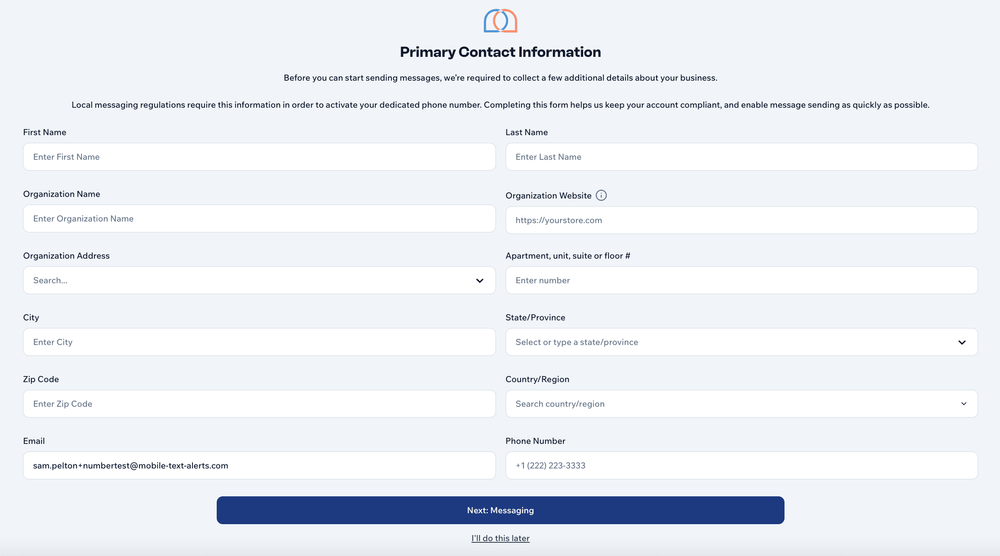
1. Enter primary contact info
The primary contact info form just asks for your basic contact and company info.
2. Enter basic messaging info
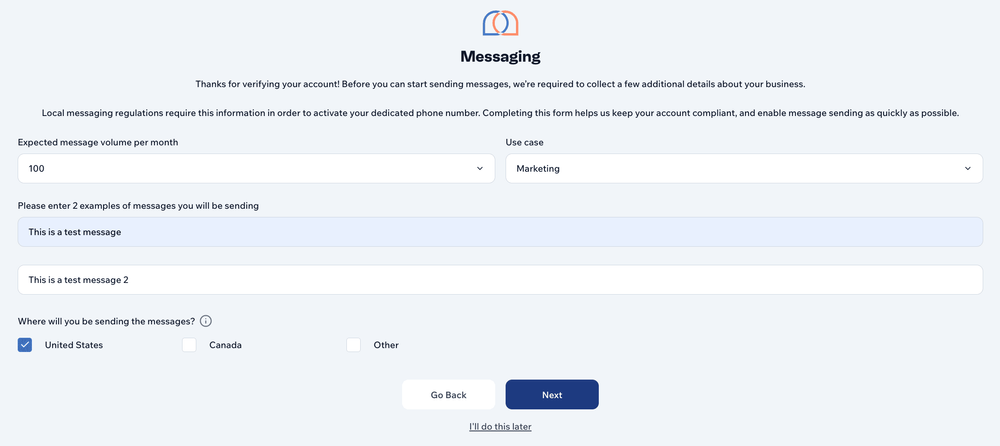
The messaging form asks for some simple information about the kinds of messages you'll be sending:
- Approximate volume of monthly messages
- Use case (or primary purpose for sending your messages)
- Country or countries you'll be sending messages to
- 2 specific examples of the types of messages you'll be sending (these do not need to be real examples but simply illustrative of what kinds of messages you'll be sending) - see example messages below...
- Ecommerce promo: "Today only! Take an extra 20% off clearance: [link]. Reply STOP to opt out."
- Appointments: "Reminder: [Business] — [Name], your appointment is [date/time]. Reply C to confirm, R to reschedule. STOP to opt out."
- Two-factor code: "Your [Brand] verification code is #####. Enter at [link]. If you didn't request this, reply STOP."
3. Wait for approval
Once your info is submitted, you just need to wait for approval, which typically takes 1 business day.
You'll receive a notification via email once your phone number is approved.
Can I send messages while I wait for approval?
Yes, you can send pre-approved messages while you wait for approval from the mobile carriers.
You'll be able to choose from a list of pre-approved messages during the waiting period in case you'd like to test out the system while you wait.
You're now armed with all the info you need to get you phone number verified! It's really an easy (but necessary!) process.
If you haven't yet, go ahead and get a free trial account now so you can get the approval process started.