



Carrier filtering is more strict by the day because the volume of unwanted text messages continues to grow rapidly.
Recent CBS reporting, citing PIRG data, shows that Americans received 19 billion robotexts in 2024, compared to approximately 7 billion in 2021. This steep increase has created a messaging environment where unsolicited texts are a routine part of daily life.
If you break that number down evenly across the U.S. population, it comes out to about one unsolicited text per person per week. That average doesn’t tell the full story, though. Spam is rarely distributed evenly.
Some people barely get any, while others get hit constantly. Many consumers now report receiving 10 to 20 unwanted messages a day, ranging from random promotions to notifications they never signed up for.

Carriers design their filtering systems around these patterns and around regulatory factors such as CTIA messaging principles. Their job is to protect subscribers, and the easiest way to do that at scale is to apply strict automated rules. Those rules stop a lot of bad actors, but they also catch legitimate businesses that are simply sending their promotions the wrong way.
The goal of this guide is to help you avoid that problem.
Below are best practices, including the CTIA messaging principles, that matter most for promotional SMS based on current carrier standards, CTIA guidelines, and what we’ve learned from helping thousands of organizations send reliable, high-quality messaging through Mobile Text Alerts.
CTIA Messaging Principles that Matter Most for Promotional SMS (+ Other Compliance Principles): TL;DR
CTIA Messaging Principles
| # | Best Practice | Key Actions |
|---|---|---|
| 1 | Use a consistent, recognizable sender ID | Use one dedicated 10DLC/toll-free for promos, warm it up slowly, include your brand name in every SMS. |
| 2 | Build a strong sender reputation | Keep opt-outs/complaints low, avoid volume spikes, clean your list, stick to your registered use case, watch performance. |
| 3 | Use opt-in best practices | Use explicit (and ideally double) opt-in, avoid purchased/auto-added lists, explain what they’ll get, log consent. |
| 4 | Follow CTIA messaging principles | Identify your brand, send during allowed hours, include opt-out, avoid restricted content, match your registered campaign type. |
| 5 | Add clear opt-out instructions | Always include “Reply STOP to unsubscribe” at the end, use standard keywords, let your platform auto-honor opt-outs. |
Overall Compliance Best Practices (Including CTIA)
| # | Best Practice | Key Actions |
|---|---|---|
| 1 | Use a consistent, recognizable sender ID | Use one dedicated 10DLC/toll-free for promos, warm it up slowly, include your brand name in every SMS. |
| 2 | Build a strong sender reputation | Keep opt-outs/complaints low, avoid volume spikes, clean your list, stick to your registered use case, watch performance. |
| 3 | Use opt-in best practices | Use explicit (and ideally double) opt-in, avoid purchased/auto-added lists, explain what they’ll get, log consent. |
| 4 | Follow CTIA messaging principles | Identify your brand, send during allowed hours, include opt-out, avoid restricted content, match your registered campaign type. |
| 5 | Personalize your promotional SMS | Segment your list, use merge tags, trigger messages based on behavior/events, tailor offers to their activity. |
| 6 | Avoid spam trigger words & risky language | Skip things like “FREE!!!” / “ACT NOW!!!”, avoid all caps + heavy punctuation, rewrite into calm, clear alternatives. |
| 7 | Keep messages clear, concise, and focused | Aim for ~1 segment (160 chars), lead with the offer, use one main CTA, remove hypey filler. |
| 8 | Use short links safely | Avoid public shorteners (bit.ly, etc.), use branded domains, keep redirects simple, match link destination to message. |
| 9 | Add clear opt-out instructions | Always include “Reply STOP to unsubscribe” at the end, use standard keywords, let your platform auto-honor opt-outs. |
| 10 | Monitor deliverability & filtering signals | Track delivery rate, failure codes, opt-out spikes, engagement trends; investigate sudden changes right away. |
What CTIA Principles Matter Most for Promotional SMS?
When it comes to the CTIA in particular, some of the principles that matter the most include:
- Brand identification
- Clear consent
- Clear opt-out instructions
- Message transparency
- Truthfulness
- Alignment between registered use case and actual content
How Carrier Spam Filtering Works in November 2025
Before we get into the tactics, it helps to understand the system you're working with.
To match the volume of unwanted texts climbing every year, carrier filtering has moved from being a simple “spam detector” to a full security system.
They don’t just scan the message itself. They look at the sender behind it, the traffic patterns leading up to it, and whether the message aligns with what that sender is supposed to be sending.
Below are the core components of how filtering works today.
1. Machine-learning models analyze every message instantly
Carriers use advanced ML models trained on billions of spam messages.
These models look for:
- Suspicious wording (“Free!!!”, “Winner,” “Claim now”)
- Excessive punctuation or formatting
- Patterns common in scam campaigns
- Similar messages coming from multiple unrelated senders
- Link structures associated with phishing or fraud
Although the filtering accuracy is intentionally opaque and not publicly quantifiable to prevent scammers from reverse engineering the systems, case studies like this proves its effectiveness.
The system is extremely good at spotting anything that resembles spam, even when the sender is legitimate.
2. Your “sender reputation” is scored before content even matters
Every phone number, short code, toll-free number, and 10DLC has a real reputation score behind the scenes.
Carriers evaluate:
- Complaint and opt-out rates
- How often subscribers fail to engage. A consistent low engagement rate can send a signal to the carrier that your SMS is an unwanted message. Or in better words, spam.
- Volume spikes (a major red flag) especially from a new SMS account
- Past compliance violations
- How “clean” your subscriber list is
- Whether you follow your registered use case
If your reputation is weak, carriers may filter your message before checking the content. This is why even perfectly written messages get blocked when the underlying reputation is unhealthy.
3. Traffic-pattern analysis detects unusual or risky sending behavior
Carriers know what “normal” messaging looks like for businesses.
They flag patterns such as:
- Sending large volumes from a new number without warming it up
- Sending identical messages to thousands of people at once.
- Sending only promotional content without any engagement or replies
- Abrupt spikes in timing (“nothing for weeks → 50k sends in one hour”)
These patterns are hallmarks of spam operations, so legitimate businesses can get caught if they send without proper pacing.
4. CTIA messaging principles and use-case compliance is enforced automatically
Asides looking out for legal violations, carriers also enforce CTIA messaging principles, which governs consumer protection across all business messaging.
Carriers check whether your message:
- Identifies your brand clearly
- Matches your registered 10DLC use case
- Includes an opt-out instruction when required
- Aligns with the consumer consent you collected
- Avoids deceptive or manipulative language
If anything feels inconsistent or non-transparent, the system flags it.
5. Link reputation
A single unsafe link can expose subscribers to malware, credential theft, or identity scams, so carriers treat URLs as high-risk elements by default.
They look at:
- Domain reputation
- Whether the link comes from a trusted or “public” shortener
- SSL validity
- Past associations with phishing
- Whether the link destination matches the message context
Public shorteners like TinyURL or Bitly are frequently abused by spammers, so promotional campaigns using them are at significantly higher risk.
6. Registration mismatches trigger automatic filtering
To prevent subscribers from receiving SMS with content contrary to what they signed up for, carriers now compare your declared use case against the messages you actually send.
They crosscheck these four things:
- Your business identity (who you said you are during registration)
- Your declared campaign type / use case (e.g., “appointment reminders,” “two-factor authentication,” “customer care,” “promotional offers”)
- Your sending behavior (volume, timing, frequency, and consistency)
- Your message content (what the message actually says)
If anything doesn’t align, for example, a “customer support” campaign using high-frequency bulk sends or a brand registered as a local business linking to unrelated third-party domains, these inconsistencies signal one of two things to a carrier:
(1) the sender isn’t who they claim to be, or
(2) the sender is misusing the approved use case.
Either scenario triggers stricter scrutiny, throttling, or outright blocking.
10 Best Practices to Avoid Carrier Spam Filters for Promotional SMS
Promotional SMS can be one of your highest ROI channels, but you first have to ensure it is compliant enough, follows current carrier standards and CTIA messaging principles, so it reaches people.
Below are the 10 best practices that you should follow based on research and from what we’ve learned supporting thousands of brands on Mobile Text Alerts.
Use a Consistent, Recognizable Sender ID
One of the fastest ways to get filtered is to send promotional messages from unfamiliar and or inconsistent numbers. Carriers and subscribers treat sender identity as a core trust signal.
Imagine receiving a promotional SMS from different numbers all claiming to be McDonald’s. Would that make you think, “Scam alert”? Yes? Good. ⚠️
This is the feeling you give to subscribers and carriers when your sender ID changes frequently, or if it looks like a random, disposable number.
And when your promotional SMS is considered high risk, you lose trust, and get flagged by carriers.
To be on the safer side, do this:
● Use a single, dedicated number for all promotional traffic.
Carriers want to see consistent identity → consistent messaging → consistent behavior.
● Choose the right sender type for promotions.
For most brands, promotional traffic belongs on:
- Toll-Free (good for promotional campaigns) Requires verification; safe for promos after approval. Best cost efficiency.
- 10DLC (also good for promotional campaigns) Verified + tied to a registered use case = high trust.
● Warm up new numbers gradually
If you register a new 10DLC or toll-free number, don’t launch with a 10,000-recipient promotion on day one. Carriers expect progressive ramp-up. A sudden surge gives off spam vibes to carriers.
● Make sure your sender ID aligns with your brand.
If your sender number has never contacted a subscriber before, your message already starts at a disadvantage.
Build trust through:
- Consistent identity
- Predictable message themes
- Clear brand identification in every promotional SMS
● Include your brand name in the first line.
This is a very overlooked and underused trust building tactic. Example: “[AthleteFuel] Your 20% off recovery bundle ends tonight.”
Why this matters
Promotional traffic is always held to a higher scrutiny level because it’s more likely to trigger complaints. Nobody likes to be sold to, duh.
A stable sender ID reduces that risk by a ton and it’s one of the simplest fixes most brands overlook.
With Mobile Text Alerts, you get a stable sender ID numbers and a detailed analytic dashboard for deliverability.
Build a Strong Sender Reputation to Improve SMS Deliverability
A sender reputation is essentially your “credit score” in the SMS world. It reflects how trustworthy carriers believe your number is based on how subscribers respond to your messages.
Carriers track several reputation signals at once: complaint rate, opt-outs, delivery failures, engagement levels, and the consistency of your sending patterns. When those signals trend negative, carriers interpret your promotional traffic as unwanted and begin filtering or throttling your promotional messages.
According to the CTIA, elevated opt-out rates are treated as clear “consumer dissatisfaction,” which is one of the core triggers carriers use to tighten filtering.
In other words, promotional SMS doesn’t just need a good message, it needs good behavior data behind it.
To strengthen your sender reputation, do this:
● Keep complaint and opt-out rates low.
High dissatisfaction, especially during promotions, signals that your content isn’t wanted, which damages reputation quickly.
● Maintain steady, predictable sending patterns.
Avoid abrupt volume spikes, which carriers associate with spam operations.
● Clean your list frequently.
Inactive or invalid numbers create delivery failures, which lower your trust score over time.
● Follow your registered use case.
If you registered your number for promotional content, stick to promotions; misaligned traffic is a major filtering trigger.
● Monitor your performance weekly.
Track delivery trends, failure codes, unsubscribe spikes, and engagement to catch issues before they affect inbox placement.
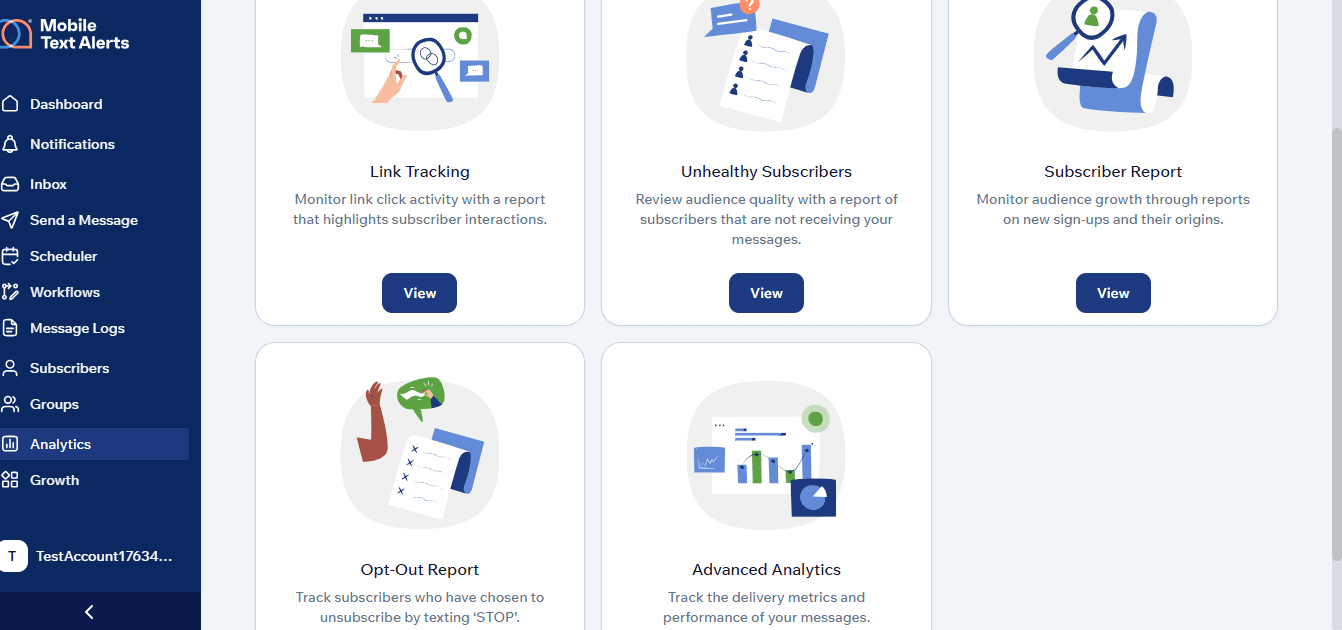
With the Mobile Text Alerts software, you get access to these detailed analytics that affect your SMS performance.
Why this matters
Sender reputation has a direct impact on your promotional SMS deliverability. If your reputation dips, carriers will filter your traffic regardless of how good your copy is.
A strong reputation, on the other hand, increases your inbox placement rate and directly boosts the ROI of your promotional campaigns.
Try it out for free here.
Use Opt-In Best Practices to Avoid Carrier Filtering
It’s already icky enough receiving SMS you never asked for, how much more a promotional one. The eyeroll is universal.
Carriers feel the same way, which is why consent is the single biggest factor they use to judge the safety of your promotional traffic. They look for clear, documented permission and patterns that show your subscribers actually wanted to hear from you.
When numbers mysteriously appear on your list, or when people “suddenly” start opting out in droves, carriers flag your traffic faster than your subscribers can type “STOP.”
To stay compliant and avoid filtering, do this:
● Use explicit, documented opt-in only.
Subscribers must knowingly agree to receive promotional texts, not general updates or random alerts.
● Use double opt-in when possible.
A quick “Reply YES to confirm” gives carriers confidence that the subscriber truly intended to join.
● Avoid high-risk opt-in practices.
Auto-adding customers, “every purchase opts you in,” and purchased lists, are a huge NO. Carriers see right through these shortcuts.
● Explain the value upfront.
Show what they’re signing up for: “Get promos, drops, and exclusive discounts via SMS.” Clear expectations = fewer complaints.
● Store proof of consent for every subscriber.
Mobile Text Alerts logs opt-ins from keywords, web forms, QR codes, and Text-to-Join giving you a clean audit trail if carriers ever question your list.
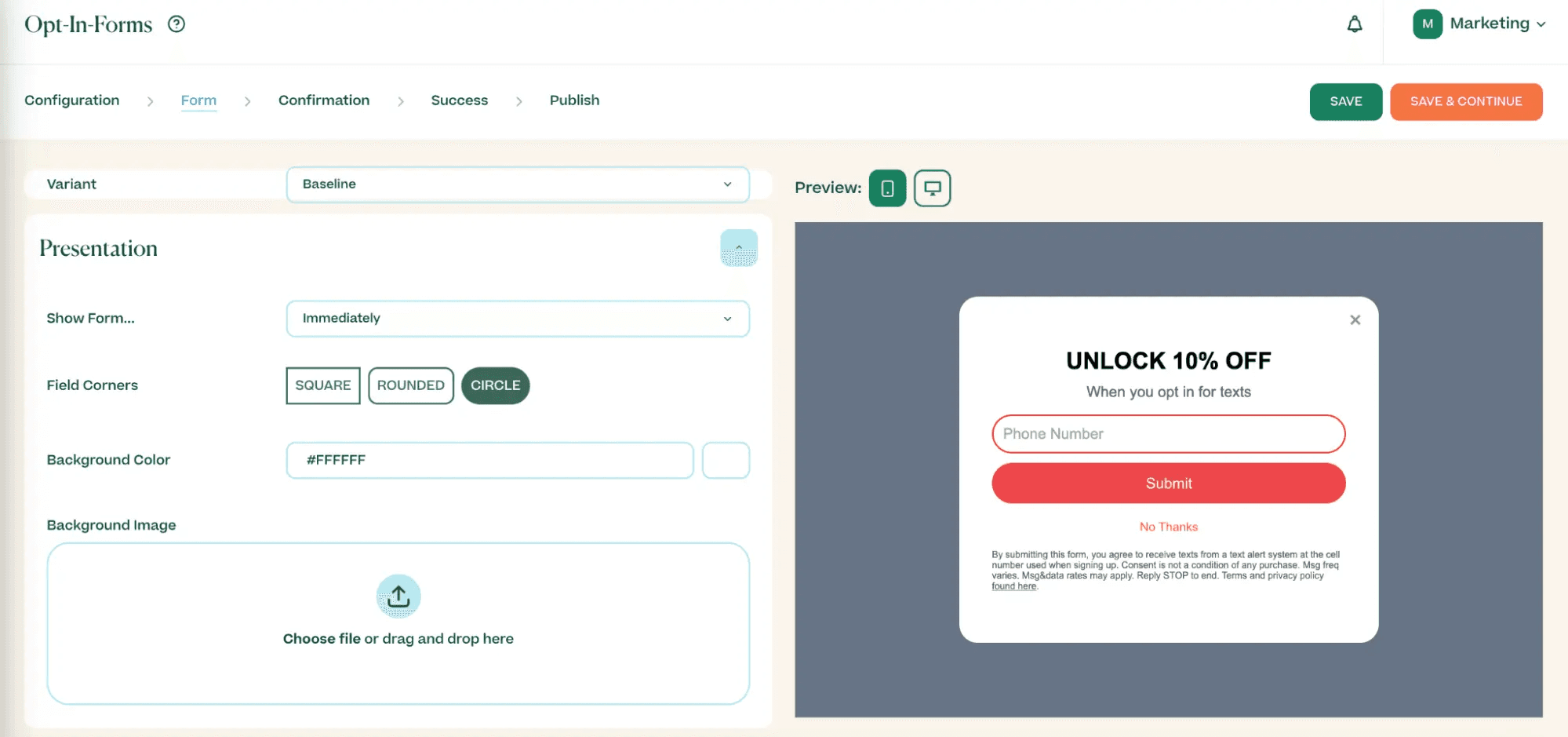
Mobile Text Alerts Editable Opt-In Form
Why this matters
When your list is built on solid consent and honest expectations, carriers treat your traffic as safe, and your promos actually reach the people who want them.
Follow CTIA Messaging Principles to Stay Carrier-Compliant
CTIA messaging principles may not be thrilling bedtime reading, but they’re the backbone of whether your promotional SMS gets delivered or filtered away.
Carriers treat your messaging as legit only if you check the compliance boxes: brand registration, documented consent, clear company name in each text, opt-out instructions, and no “questionable content” (for example, sex, hate, weapons, tobacco).
Even though CTIA principles aren’t legally binding, adhering to them is critical because they align with federal laws such as the Telephone Consumer Protection Act (TCPA) and the Federal Trade Commission (FTC) Act.
Non-compliance can result in substantial fines ranging from $500 to $1,500 per message and obviously, carrier filtering.
Here’s what to do to make sure you are following the CTIA messaging principles that matter most for promotional SMS:
● Identify your brand clearly in every promotional SMS.
Your company name should be the first thing recipients see. Ditch the anonymous promos.
● Stay within approved sending windows.
Avoid sending before 8 a.m. or after 9 p.m. in the recipient’s time zone. Nobody wants to see a promotional SMS before their first coffee.
● Include visible opt-out instructions every time.
“Reply STOP to unsubscribe” is minimum compliance. If people can’t easily opt out, carriers mark that as high risk.
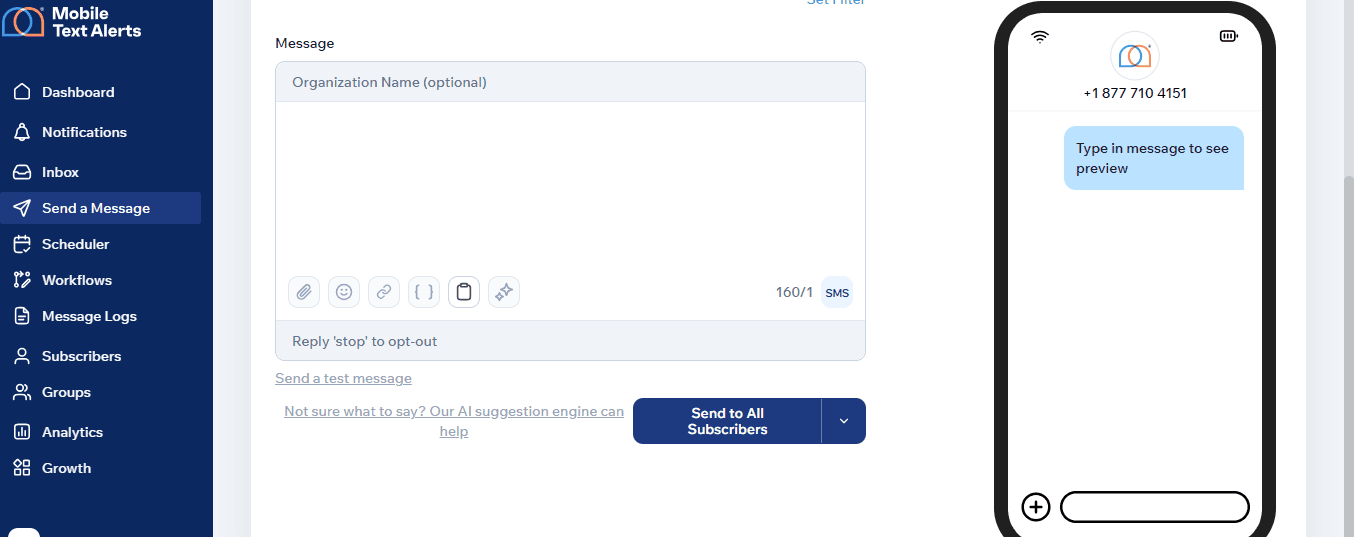
All messages from the MTA dashboard offer an opt out option.
● Stick to your registered use case and tone.
If you registered for “promotions,” don’t send “urgent alerts” or “transactional updates,” that mismatch increases filtering risk.
● Commit to ongoing reviews and audits.
One audit at campaign launch isn’t enough. Regular check-ups reduce non-compliance mistakes before they hurt your sender reputation.
Why this matters
Aside from the obvious fine and filtering risk, your subscribers will trust your promotional SMS more if it’s coming from a compliant brand.
Personalize Promotional SMS to Reduce Spam Complaints
When everyone on your list gets the same offer, at the same time, with the same wording, carriers see it as mass-blast behavior, and subscribers feel like just another number.
That combination leads to opt-outs, low read rates over time, complaints, and lower SMS deliverability across the board.
Personalization solves this problem by showing carriers (and your audience) that your promos are intentional and relevant.
It signals that you understand who you're texting and why they’d care about the message you're sending.
To personalize without crossing any lines, do this:
● Use real subscriber data to make promos feel relevant.
Personalization goes beyond “Hi Sarah.” It’s timing, product interest, past behavior, and preferences.
Bad personalization:
“Hi Sarah, 20% off everything today!”
(Offers no context.)
Good personalization:
“Hi, Sarah! Your refill is due soon. Get 20% off your favorites today only.”
(Relevant and meaningful.)
● Segment before you send any promotional SMS.
Instead of blasting your entire list, group subscribers by behaviors:
- Repeat buyers
- High-intent browsers
- Inactive customers
- Product category shoppers
- Loyalty members
This reduces opt-outs and increases engagement; two core SMS deliverability strategies.
● Use event-based or behavior-based triggers.
Send promos tied to:
- Abandoned carts
- Product categories viewed
- Post-purchase timelines
- Seasonal buying cycles
This makes your promotional SMS feel timely instead of intrusive.
● Use Mobile Text Alerts merge tags to personalize details automatically.
- [first name]
- [favorite product]
- [last purchase date]
Adding these tiny moments of specificity makes your promos feel human.
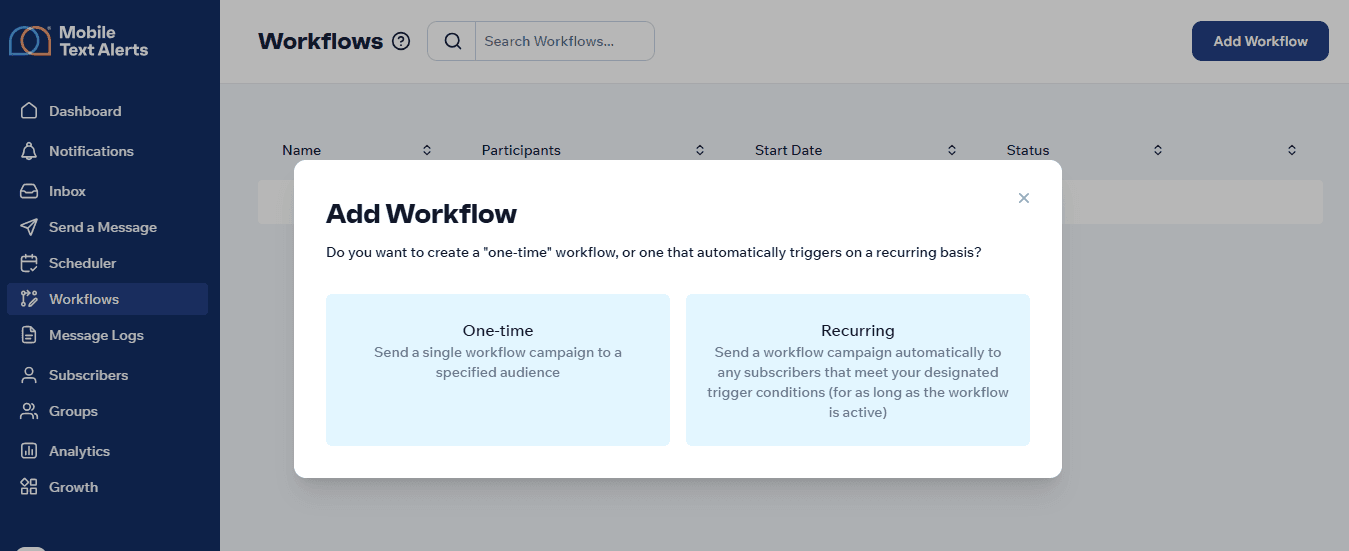
● Set up automated promotional flows using MTA segment + trigger logic.
Mobile Text Alerts lets you build automations like:
- “Send a 10% code to customers who haven’t purchased in 30 days.”
- “Send a VIP offer to loyal customers when a new product drops.”
- “Send a restock promo to subscribers who viewed a specific item.”
You can either choose for it to be recurring or a one time thing:
Why this matters
Even though your subscribers already gave their consent to you to be sold to, they still want to feel prioritized in the act and not just some lead or a number on your dash board.
Happy customers ~ good buyer behavior ~ positive signals to carriers.
Avoid Spam Trigger Words and High-Risk Language Patterns
Certain phrases, punctuation styles, and writing habits are so common in fraud and scam campaigns that carriers automatically treat them as red flags.
If your promo message accidentally matches those patterns, filtering becomes much more likely even if everything else is compliant.
To keep your messages clean and signal “real brand, not a scam,” do this:
● Avoid overly hyped or aggressive sales language.
Terms like:
- “FREE!!!”
- “WINNER”
- “GUARANTEED”
- “ACT NOW”
- “URGENT”
- “MAKE MONEY FAST”
- “RISK-FREE”
These words aren’t inherently illegal, but they raise suspicion because scammers overuse them.
● Reduce formatting that looks aggressive or misleading.
All caps, stacked punctuation (!!!, ???), and over-styled messages scream “mass spam” to carriers.
Example red flags: “CLICK NOW!!!” or “LAST CHANCE!!! 🔥🔥🔥”
● Rewrite high-risk phrases into clear, direct alternatives.
Here’s a quick reference table:
| Risky phrasing | Carrier safe alternatives |
|---|---|
| “FREE!!! CLAIM NOW” | “Enjoy a complimentary sample today” |
| “URGENT: ACT FAST” | “Today’s offer ends soon” |
| “WINNER! YOU’VE BEEN SELECTED” | “Here’s an exclusive offer just for you” |
| “LIMITED STOCK! BUY NOW” | “Only a few left—grab yours while available” |
Small shifts like this keep the meaning without triggering filters.
● Keep your tone straightforward and honest.
Carriers prefer messages that read like a real brand. Your copy should speak to your audience like it would in a face-to-face conversation; clear and direct.
● Lead with value, not pressure.
Promos framed around convenience (“Restock and save 15% today”) may work better than promos framed around fear (“Don’t miss out!”).
We understand it can be pretty stressful trying to follow all of these guidelines. However, with the Mobile Text Alerts AI tools, you don’t always have to rack your brain for safe carrier alternatives.
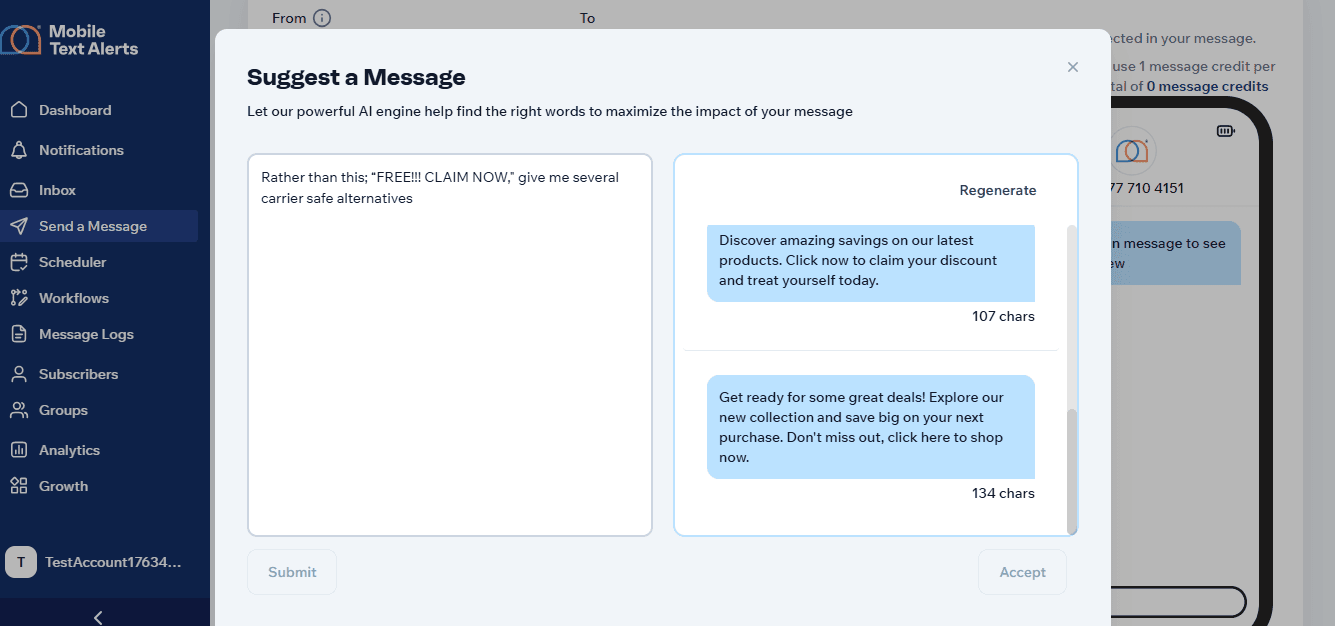
Why this matters
Carriers judge your message in milliseconds with these keywords regardless of your legitimacy.
Clean language signals that your promotional SMS is legitimate and helps your offers reach the people who actually want them.
Keep Promotional SMS Clear, Concise, and Carrier-Friendly
The average human attention span is estimated between 8–12 seconds, which means your promotional SMS has only a brief moment to land its message. Most people decide almost instantly whether to keep reading, tap, or ignore and move on.
Long, wandering messages would only get ignored, skimmed, or opted out of. All of which becomes a quiet but powerful negative signal against your deliverability.
Concise promos help carriers recognize your message as a clean, compliant marketing send by removing friction and giving people exactly what they need to know, nothing they don’t.
To keep your promotional SMS clear and effective, do this:
● Follow the 160-character guideline.
Your promotional texts should fit comfortably into one segment when possible. Shorter messages are easier to read, less likely to confuse subscribers, and less likely to trigger compliance reviews.
● Lead with the value.
Put the offer upfront so subscribers don’t have to decode what you want from them. “Save 15% today on your refill” beats* “Hello! We wanted to remind you of something important…”*
● Keep one idea per message.
Promos with multiple CTAs or themes (“Shop now + join our giveaway + leave a review”) feel scattered and may perform worse. Focus on one clear action.
● Remove filler words and hype language.
Words like “just,” “really,” “very,” or “super amazing” clutter the message and make it feel less trustworthy.
Here’s a quick look at clean vs spammy SMS:
| Spammy | Clean |
|---|---|
| “HEY!!! LAST CHANCE TO BUY NOW!!! 50% OFF EVERYTHING IF YOU ACT FAST!!! 🔥🔥🔥” | “Today only: Get 50% off all items. Use code SAVE50 at checkout.” |
| “Hi! We have an important UPDATE you’ll want to check out asap!!!” | “Your favorites are 15% off today—tap here to shop.” |
Why this matters
Concise promos get read more, reported less, and deliver clearer positive engagement signals back to carriers.
Use Short Links Safely to Prevent Carrier Filtering
I’m sure you’ve heard horror stories like: someone clicks a link in a text, and suddenly their phone is infected, their bank account is compromised, or they’re redirected into a phishing maze.
Stories like these are exactly why carriers scrutinize URLs inside promotional SMS so aggressively.
To carriers, links are the highest-risk part of any message. They inspect them for safety, legitimacy, and consistency before deciding whether your promotional SMS should be delivered or filtered.
Here’s how to keep your links clean and trustworthy:
● Avoid risky or unknown domains that carriers associate with fraud.
Public shorteners like Bitly and TinyURL are frequently abused, so carriers treat them with caution. If your promo uses one, your deliverability will take a hit.
● Use branded or verified domains whenever possible.
A link that clearly ties back to your brand builds trust instantly.
Example:
Safe: athletefuel[dot]com/recover
Risky: bit[dot]ly/48Hsdq
● Keep link behavior predictable.
Carriers study your URL behind the scenes. If it jumps through multiple redirects, mismatched domains, or unsecured pages, they flag it as suspicious.
● Match your link to the message context.
If your promo text talks about a skincare sale but your link leads to a crypto site… carriers assume you’re a scammer (and honestly, subscribers will too).
● Use Mobile Text Alerts’ built-in link tracking instead of public shorteners.
MTA gives you a safe, trackable redirect with clean analytics, without triggering the “generic shortener” filters carriers dislike.
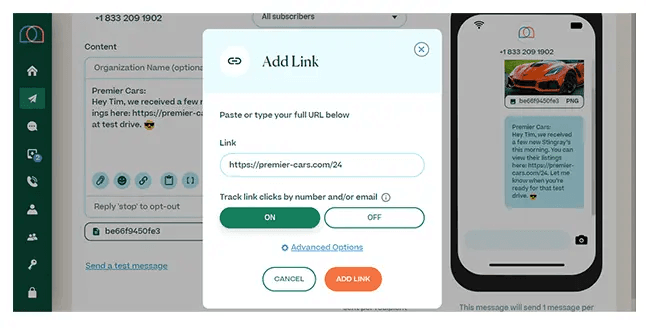
Why this matters
Links are one of the biggest filtering triggers for promotional SMS. Clean, branded, predictable URLs tell carriers your message is safe, leading to higher deliverability, fewer blocks, and more clicks from subscribers who actually trust what you’re sending.
Add Clear Opt-Out Instructions to Stay Compliant
A recent Mixed Signal report shows that out of 40 retailers studied, 12 continued serving targeted ads even after customers sent Global Privacy Control (GPC) opt-out requests.
That’s nearly one-third of brands failing to honor a basic privacy choice, and it’s exactly the kind of behavior that carriers want to prevent in SMS.
In texting, ignoring opt-outs is both a bad look and a fast track to getting filtered, flagged, or shut down.
Carriers expect every promotional SMS to include a visible opt-out path, and they treat the absence of one as a compliance risk.
Here’s how to get it right every time:
● Use the standard STOP keyword in every promotional SMS.
“Reply STOP to unsubscribe” is the cleanest and most widely recognized version.
● Don’t hide your opt-out instruction.
Place it at the end of the message where people expect to see it. Buried or inconsistent opt-outs cause issues for both subscribers and carriers.
Examples
Compliant:
“[GlowSkin] Today only: 20% off all serums → glowskin[dot]com/offer. Reply STOP to unsubscribe.”
Risky:
“20% off today! glowskin[dot]com”
(The recipient has no way to opt out.)
Confusing:
“Sale today! Reply BYE if you want out.”
(Non-standard keyword = filtering risk.)
● Let Mobile Text Alerts handle opt-outs automatically.
When someone replies STOP, MTA removes them immediately, logs the event, and prevents future sends.
Why this matters
Opt-out clarity signals respect for the subscriber’s choice and carriers look for that signal every time you send a promotional SMS.
Monitor SMS Deliverability Metrics to Detect Carrier Filtering Early
“How would I know if my messages are getting filtered?”
Good question.
Short answer: you won’t—not until your whole promotional campaign quietly tanks or gets blocked outright.
Long answer: carriers won’t send you a friendly warning. They don’t announce when they start throttling your number or flagging your content. Instead, filtering shows up indirectly through your data: lower delivery rates, strange failure codes, rising opt-outs, or sudden drops in engagement.
To spot this early before the damage spreads across your entire promotional SMS program, you'll need to monitor your metrics.
Here’s what to watch. as you track delivery, failures, complaints, and opt-outs:
● Delivery rate
Delivery performance is the first place carrier filtering leaves fingerprints. If you normally deliver at 98% and suddenly drop to 91%, that’s not a coincidence, it’s a signal.
● Failure codes
Each code means something:
- “Blocked” → carrier filtering
- “Spam detected” → content issue
- “Invalid destination” → list hygiene problem
- “Rejected” → sender reputation or use-case mismatch
These codes tell you exactly where to investigate next.
● Complaint spikes
More STOP replies than usual signals subscribers are unhappy which would affect carrier filtering.
● Opt-out rate
If opt-outs climb past the healthy rate of 0.5%-2%, carriers would pay extra attention to your promotional campaigns even if your messages are compliant.
P.S.: Mobile Text Alerts makes this easy by showing all delivery and failure insights in one dashboard so you can spot problems before they snowball.
CTIA Messaging Principles (+ Other Compliance Concerns) for Promotional SMS: Pre-Send Checklist
To wrap this up, here's a pre-send checklist you can always use before sending a promotional message to your audience:
- Brand name included
- Offer clearly stated
- Link works & matches message context
- STOP instruction visible
- Sender ID correct
- Sent during approved hours
- No spam-trigger formatting
- One segment
- Matches registered use-case
If you want an SMS platform that helps you follow these best practices + CTIA messaging principles without the stress or guesswork, Mobile Text Alerts does just that.
Ready to send high-deliverability promotional SMS?
FAQs About Carrier Filtering for Promotional SMS
1) Why are my promotional SMS messages being filtered?
Your messages are filtered when carriers detect risky content, inconsistent sender behavior, poor list quality, or missing compliance elements. Common culprits include: high opt-outs, generic short links, identical mass sends, mismatched use-case content, or unstable sender IDs.
2) What affects my sender reputation?
Complaint rate, opt-outs, delivery failures, sending patterns, link quality, and how closely your content matches your registered campaign type. Carriers update this score continuously.
3) Which words trigger carrier spam filters?
Words widely abused by scammers: FREE!!!, WINNER, GUARANTEED, URGENT, RISK-FREE, ACT NOW, BUY NOW, CLICK NOW. These terms don’t guarantee filtering, but they raise suspicion and lower deliverability.
3) Why do links matter so much?
Links are the most exploited part of a text message. Carriers check domain reputation, HTTPS validity, redirect chains, and whether the destination matches your message. Risky or generic short links dramatically increase filtering.
4) What content patterns do carriers flag most?
Overuse of salesy terms, lack of opt-out instructions, aggressive punctuation, ALL CAPS, mismatched brand identity, non-transparent offers, and messages that look identical to known spam templates.
5) How can I improve SMS deliverability for marketing campaigns?
Use a consistent sender ID, maintain list hygiene, personalize your promos, avoid risky language, warm up new numbers, use branded links, monitor analytics weekly, and stay within your registered use-case.